SKYJO Online with Friends: Complete Multiplayer Guide (2026)
The ultimate guide to playing SKYJO online with friends. Discover the best platforms, learn how to create private game rooms, master multiplayer strategies, and start playing with friends anywhere in the world.
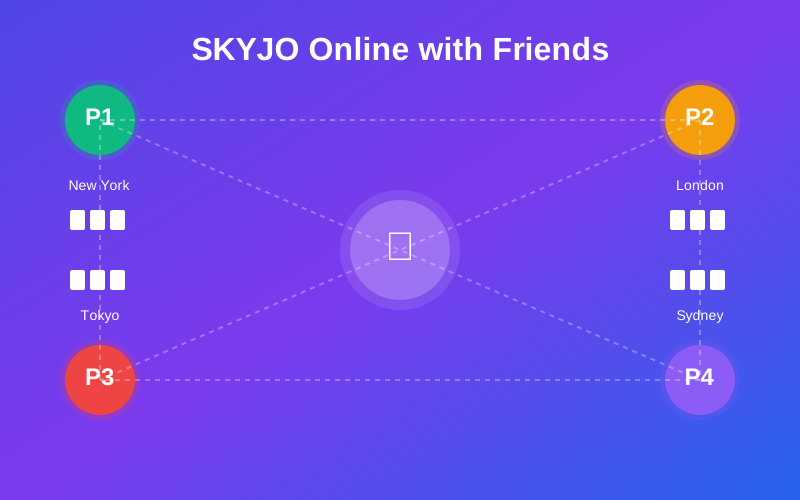
Quick Facts: SKYJO Online Multiplayer
| Feature | Details |
|---|---|
| Game Type | Strategic card game - lowest score wins |
| Players Online | 2-8 players (optimal: 3-5 players) |
| Best Browser Platform | Skyjo.net (free, no download) |
| Best Mobile App | Skyjo-o (4.88/5 stars, 140K downloads) |
| Game Duration | 30-60 minutes per full game |
| Round Duration | 5-10 minutes per round |
| Cost | Free on all platforms |
| Private Rooms | Yes - all platforms support friend invites |
| Age Range | 8+ years old |
What is SKYJO Online?
SKYJO is a strategic card game where players compete to achieve the lowest score by swapping, revealing, and discarding cards from their 3x4 grid. The game combines luck and strategy, with the unique column elimination rule allowing players to remove matching cards for massive point reductions.
Playing SKYJO online with friends brings all the excitement of the physical card game to your screen. Whether you're across the room or across the world, online platforms let you create private game rooms, invite friends with a simple code or link, and enjoy real-time multiplayer sessions without needing the physical deck.
In 2026, multiple platforms offer SKYJO online play - from browser-based options requiring no download to feature-rich mobile apps with AI opponents and global matchmaking. This guide covers every platform, walks you through setup, and shares winning strategies for online multiplayer.
Easy Setup
Create a private room in seconds and share a simple code with friends
Play Anywhere
Browser and mobile options work on any device with internet connection
Completely Free
All platforms offer free multiplayer with no hidden costs or subscriptions
Best Platforms to Play SKYJO Online with Friends
Choosing the right platform depends on your preferences: browser-based for instant access, or mobile apps for on-the-go play with additional features. Here's a comprehensive comparison of all available options in 2026.
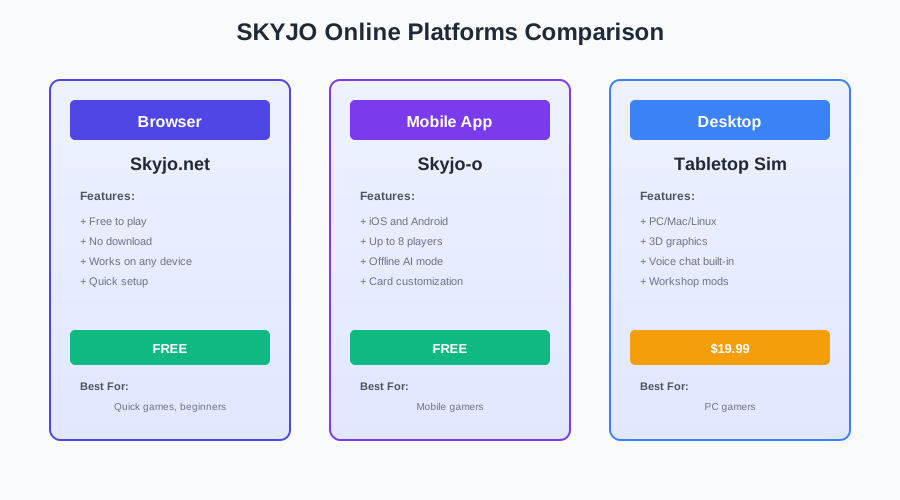
Browser-Based Platforms (No Download Required)
Skyjo.net
Most Popular Browser Option
Play SKYJO online with friends or against the computer for free. Clean interface, fast loading, and works on all devices.
Pros:
- ✓ No account required
- ✓ Instant play - no download
- ✓ Private rooms with friend invites
- ✓ Works on desktop and mobile browsers
Cons:
- ✗ Limited customization options
- ✗ No AI difficulty settings
Skyjo.de (Sky-Jo! Online)
Alternative Browser Platform
Play SKYJO online with family and friends. Similar to Skyjo.net with a slightly different interface design.
Pros:
- ✓ Free browser-based play
- ✓ Multiplayer support
- ✓ No installation needed
Cons:
- ✗ Less polished interface
- ✗ Fewer active players
Skyjo-Online.com
Third Browser Option
Another browser-based version of SKYJO with multiplayer support. Good backup option if other platforms are down.
Mobile Apps (Enhanced Features)
Skyjo-o: Flip Your Skyjoe
Top-Rated Mobile App
The most feature-rich SKYJO app with 140,000+ downloads. Available on Android and iOS with regular updates (last updated March 2026).
Pros:
- ✓ Up to 8 players online
- ✓ Private sessions with friends
- ✓ "Play against the world" mode
- ✓ Offline AI with multiple difficulties
- ✓ Card customization options
- ✓ Rewards system with collectible coins
Cons:
- ✗ Cards not fully visible with 3+ players
- ✗ Occasional connection issues reported
- ✗ Login required for all features
Best For: Players who want the most complete mobile experience with AI practice modes and global matchmaking.
Sky-Jo: Fun Family Card Game
Alternative Mobile App
Available on Google Play and App Store. Simpler interface with online multiplayer support.
Pros:
- ✓ Free to play
- ✓ Online multiplayer
- ✓ Private table invites
Cons:
- ✗ Fewer features than Skyjo-o
- ✗ Less frequent updates
Platform Comparison Table
| Platform | Type | Max Players | AI Mode | Private Rooms | Best For |
|---|---|---|---|---|---|
| Skyjo.net | Browser | 8 | Yes | Yes | Quick play, no download |
| Skyjo.de | Browser | 8 | Unknown | Yes | Alternative browser option |
| Skyjo-o | Mobile App | 8 | Yes (multiple levels) | Yes | Feature-rich mobile play |
| Sky-Jo App | Mobile App | 8 | Yes | Yes | Simple mobile experience |
How to Create a Private Game Room
Creating a private game room is simple on all SKYJO online platforms. The process typically involves creating a room, getting a shareable code or link, and inviting your friends. Here's how to do it on each platform.
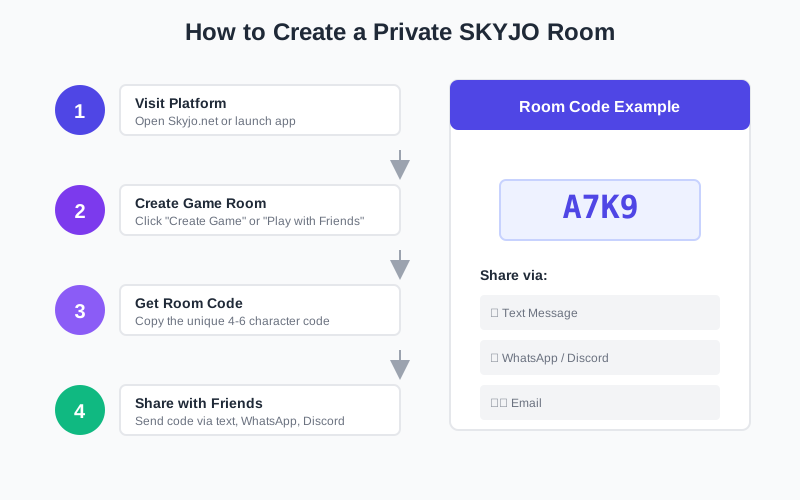
Step-by-Step: Skyjo.net (Browser)
-
1
Visit Skyjo.net
Open your browser and navigate to skyjo.net. The site works on desktop and mobile browsers.
-
2
Click "Create Game" or "Play with Friends"
Look for the multiplayer option on the main menu. This will generate a new private game room.
-
3
Set Game Options
Choose the number of players (2-8) and any custom rules if available.
-
4
Copy Room Code or Link
The platform will generate a unique room code or shareable link. Copy this to share with friends.
-
5
Wait for Players to Join
Share the code via text, email, or messaging app. Once all players join, start the game.
Step-by-Step: Skyjo-o App (Mobile)
-
1
Download and Install
Download Skyjo-o from Google Play Store or Apple App Store. The app is free (199.94 MB).
-
2
Create Account (Optional)
You can play without logging in, but creating an account unlocks all features including rewards and customization.
-
3
Select "Play with Friends"
From the main menu, choose the multiplayer option to create a private session.
-
4
Create Private Room
Tap "Create Room" and the app will generate a unique room code.
-
5
Share Room Code
Share the code with friends. They can join by selecting "Join Room" and entering the code.
-
6
Start Game
Once all players (up to 8) have joined, tap "Start Game" to begin.
Pro Tip: Room Codes
Room codes are typically 4-6 characters (letters or numbers). They expire after the game ends or if the room is inactive for too long. Create a new room if your code stops working.
How to Invite Friends to Your Game
Once you've created a private room, inviting friends is straightforward. Here are the best methods for sharing your game room across different platforms.
Method 1: Share Room Code
The most common method. Copy the room code and send it via:
- • Text message or SMS
- • WhatsApp, Telegram, or Discord
- • Social media DM
Friends enter the code in the "Join Room" section of the platform.
Method 2: Direct Invite Link
Some platforms generate a clickable link that automatically joins the room:
- • Copy the full URL from your browser
- • Share the link directly
- • Friends click and join instantly
- • No code entry needed
This method is faster but only works on browser-based platforms.
Troubleshooting Connection Issues
Problem: Friends Can't Join Room
Common causes and solutions:
- ✓ Room is full: Check if you've reached the player limit (usually 8 max)
- ✓ Code expired: Room codes expire after inactivity. Create a new room
- ✓ Wrong code: Double-check the code for typos (0 vs O, 1 vs I)
- ✓ Different platform: Ensure friends are using the same platform (Skyjo.net vs Skyjo-o)
Problem: Game Disconnects During Play
Connection issues during gameplay:
- ✓ Check internet connection: Toggle Wi-Fi off and on, or switch networks
- ✓ Restart router: If at home, restart your Wi-Fi router
- ✓ Update app: Ensure you're using the latest version (Skyjo-o v2.3.4 as of March 2026)
- ✓ Reconnection feature: Skyjo-o has a reconnection feature - wait for "joining room" to complete
- ✓ Server issues: If problems persist, servers may be down. Try again later
Problem: Game Not Loading
Platform won't load or freezes:
- ✓ Clear browser cache: For browser platforms, clear cache and cookies
- ✓ Try different browser: Switch from Chrome to Firefox or Safari
- ✓ Reinstall app: For mobile apps, uninstall and reinstall
- ✓ Check device compatibility: Ensure your device meets minimum requirements
SKYJO Online Multiplayer Rules
SKYJO online follows the same rules as the physical card game. Understanding the core mechanics is essential for competitive multiplayer play.
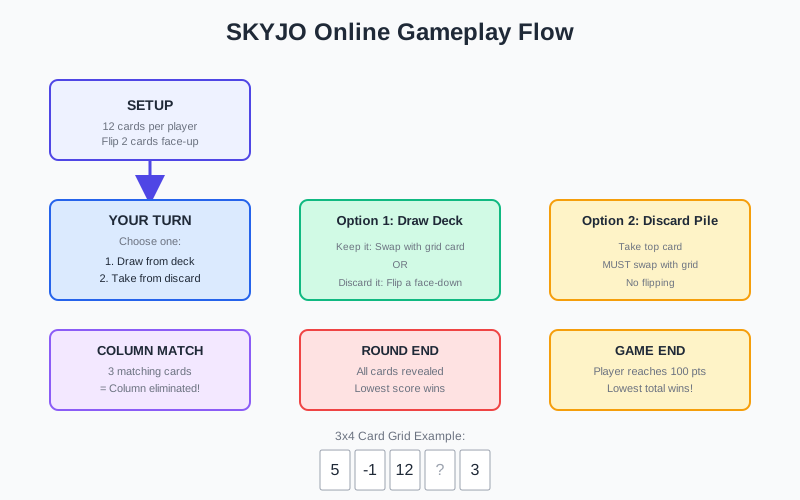
Basic Gameplay Flow
Setup
- • Each player receives 12 cards arranged in a 3x4 grid (3 columns, 4 rows)
- • All cards start face-down
- • Each player flips 2 cards face-up to begin
- • Player with highest combined visible value goes first
Objective
Achieve the lowest total score across all rounds. The game ends when any player reaches 100+ points. The player with the lowest total wins.
Turn Structure in Online Play
On your turn, you have two options:
Option 1: Draw from Draw Pile
- 1. Draw the top card from the draw pile
- 2. Look at the card value
- 3. Either:
- - Keep it: Swap it with any card in your grid (face-up or face-down)
- - Discard it: Place it on discard pile and flip one of your face-down cards
Option 2: Take from Discard Pile
- 1. Take the top card from the discard pile
- 2. You must swap it with a card in your grid
- 3. The replaced card goes to the discard pile
- 4. No flipping - your turn ends
Column Elimination Rule
Most Powerful Move in SKYJO
When all 3 cards in a single column show the same value (all face-up), that entire column is immediately removed from the game.
- ✓ All three cards must be face-up and matching
- ✓ The column is discarded immediately
- ✓ Those points are eliminated from your score
- ✓ Works with any value (but avoid eliminating -2 or -1 columns)
- ✓ Best used on high-value cards (10, 11, 12)
Scoring & Round End Conditions
How a Round Ends
A round ends when one player reveals all 12 cards in their grid. This triggers final scoring.
Critical Rule: If the player who ended the round does NOT have the lowest score, their score is doubled as a penalty.
Scoring
- • Add up all visible card values in your grid
- • Card values range from -2 to +12
- • Eliminated columns count as 0 points
- • Lowest score wins the round
Game End
The game ends when any player reaches or exceeds 100 total points across all rounds. The player with the lowest total score wins the entire game.
Winning Strategies for Online Multiplayer
Online multiplayer SKYJO requires both strategic thinking and opponent awareness. Here are proven strategies to dominate your online games.
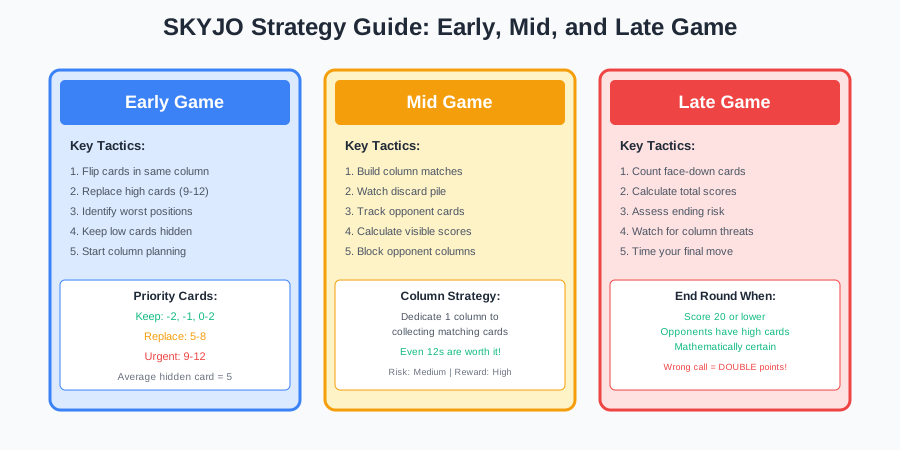
Early Game Strategy
1. Flip High Cards First
When you must flip a face-down card, prioritize positions where you suspect high values based on your initial 2 flips.
- • Reveal potential high cards early
- • This gives you more opportunities to replace them
- • Don't flip cards you suspect are low
2. Build Column Matches
Start working toward column elimination early in the game.
- • If you have two matching cards in a column, prioritize completing it
- • Focus on high-value matches (10, 11, 12)
- • Avoid matching -2 or -1 columns
Mid-Game Tactics
3. Watch Opponents' Grids
Track what cards your opponents have revealed to estimate their scores.
- • Count their visible high cards
- • Estimate their total based on face-down cards
- • Adjust your strategy if someone is close to ending
4. Discard Pile Strategy
Taking from the discard pile is safe but limits your options.
- • Take low cards (0, 1, 2) from discard immediately
- • Take negative cards (-2, -1) without hesitation
- • Avoid taking mid-range cards (5-7) unless completing a column
When to End the Round
Critical Decision: Timing Your Round End
Ending the round is the highest-risk, highest-reward decision in SKYJO. Get it wrong and your score doubles.
End the Round When:
- ✓ You have mostly low cards (0-3) and few face-down cards
- ✓ You've eliminated one or more columns
- ✓ Opponents have many high visible cards
- ✓ Your estimated total is 15 or less
Don't End the Round When:
- ✗ You have multiple face-down cards (could be high)
- ✗ An opponent has fewer visible high cards than you
- ✗ You're unsure if you have the lowest score
- ✗ Your estimated total is above 20
Reading Opponents' Grids
In online multiplayer, you can see all opponents' face-up cards. Use this information strategically:
Count Visible Points
Add up each opponent's visible cards to estimate their current score.
Track Face-Down Cards
Opponents with many face-down cards likely have higher totals (average card value is 5-6).
Watch for Column Builds
If an opponent has 2 matching cards in a column, they'll try to complete it. Block them by taking that value from the discard pile.
Tips for Playing with Friends Online
Make your online SKYJO sessions with friends more enjoyable with these practical tips for communication, house rules, and tournament play.
Use Voice Chat
Set up a Discord, Zoom, or phone call while playing. Voice communication makes the game more social and fun.
Set Turn Timers
Agree on a turn time limit (30-60 seconds) to keep the game moving and prevent analysis paralysis.
Create Tournaments
Play best-of-3 or best-of-5 series. Track cumulative scores across multiple games for competitive play.
House Rules Ideas
Customize your games with these popular house rules:
-
✓
Speed SKYJO
Game ends at 50 points instead of 100 for faster sessions
-
✓
No Doubling Penalty
Remove the score-doubling penalty for ending without the lowest score (beginner-friendly)
-
✓
Bonus for Negative Totals
If you end a round with a negative total, subtract 5 bonus points from your score
-
✓
Double Column Elimination
If you eliminate 2 columns in one round, subtract 10 bonus points
FAQ: SKYJO Online with Friends
Can I play SKYJO online for free?
Yes, all SKYJO online platforms are completely free. Browser-based options like Skyjo.net require no download or account. Mobile apps like Skyjo-o are free to download with optional in-app purchases for cosmetic items only.
How many players can play SKYJO online together?
SKYJO online supports 2-8 players. The optimal player count is 3-5 players for the best balance of strategy and game duration. With 6-8 players, games take longer but remain fun and competitive.
Do I need to create an account to play SKYJO online?
For browser platforms like Skyjo.net, no account is required. You can create a room and start playing immediately. For mobile apps like Skyjo-o, you can play without logging in, but creating an account unlocks additional features like rewards, customization, and progress tracking.
Can I play SKYJO online on mobile?
Yes. Browser-based platforms like Skyjo.net work on mobile browsers. For a better mobile experience, download dedicated apps like Skyjo-o (4.88/5 stars, 140K+ downloads) or Sky-Jo from the App Store or Google Play Store.
How long does a SKYJO online game take?
A full SKYJO game typically takes 30-60 minutes, depending on the number of players. Individual rounds last 5-10 minutes. The game ends when any player reaches 100 total points across all rounds.
What's the best platform to play SKYJO online with friends?
For instant browser play, Skyjo.net is the best option (no download, works on all devices). For mobile with advanced features, Skyjo-o is recommended (AI practice modes, global matchmaking, customization). Choose based on your preference for convenience vs features.
Can I play SKYJO online with friends in different countries?
Yes, all SKYJO online platforms support international play. As long as you and your friends have internet access, you can create a private room and play together regardless of location. Connection quality depends on your internet speed.
Why can't my friends join my SKYJO room?
Common issues: 1) Room is full (8 player max), 2) Room code expired (create a new room), 3) Typo in the code (double-check 0 vs O, 1 vs I), 4) Friends are on a different platform (ensure everyone uses the same site/app).
Is SKYJO online the same as the physical card game?
Yes, SKYJO online follows the exact same rules as the physical card game. The digital version automates card dealing, scoring, and column elimination, making gameplay faster and eliminating manual errors. The strategy and gameplay are identical.
Can I practice SKYJO against AI before playing with friends?
Yes. Skyjo.net offers basic AI opponents. Skyjo-o app provides multiple AI difficulty levels including "Hell" and "Challenger" modes for advanced practice. Playing against AI is a great way to learn strategies before competing with friends.
Start Playing SKYJO Online with Friends Today
Choose your platform and create a private room in seconds. No download required for browser play, or get the full-featured mobile app experience.

Loading comments...