SKYJO Action Online Multiplayer Guide: Play With Friends Anywhere
The complete guide to playing SKYJO Action online with friends. Learn which platforms support multiplayer, how to set up games, master action card strategies against real opponents, and dominate every online session.
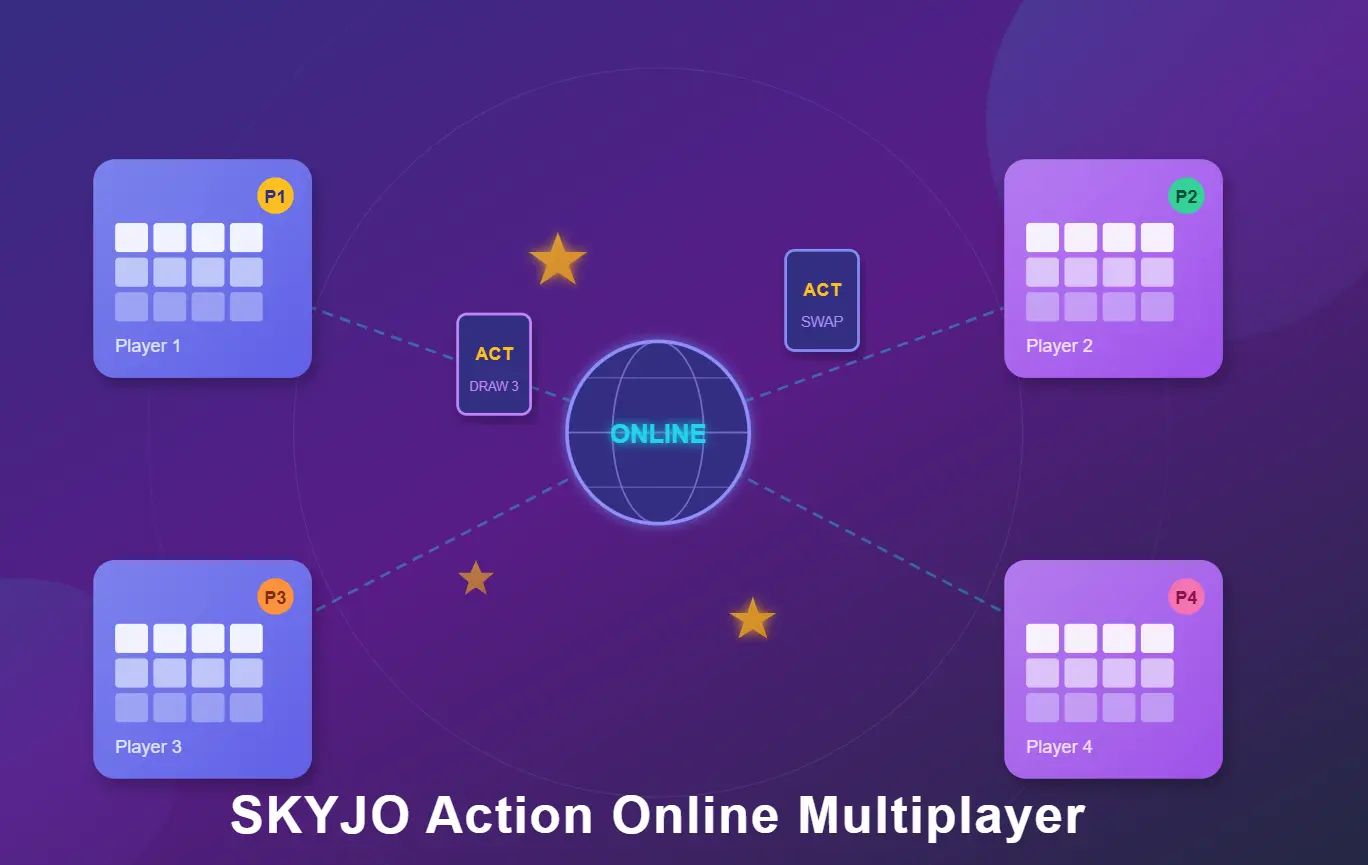
Quick Facts: SKYJO Action Online Multiplayer
| Feature | Details |
|---|---|
| Game Type | Strategic card game with action cards |
| Players Online | 2-8 players per session |
| Best Platform (Full Rules) | Tabletop Simulator (Steam Workshop) |
| Free Options | skyjo.net, Skyjo-o app (base SKYJO rules) |
| Game Duration | 30-45 minutes per full game |
| Action Cards | 9 types, 30 cards in action deck |
| Star Cards | Wild cards that activate action card draws |
| Skill Level | Beginner to Advanced (customizable difficulty) |
| Age Range | 8+ years old |
What Is SKYJO Action Online Multiplayer?
SKYJO Action is the enhanced version of the beloved SKYJO card game, adding 9 unique action cards and star wild cards to the classic formula. Playing it online with friends brings the same excitement of the physical game to your screen — complete with strategic card swapping, surprise attacks, and the thrill of clearing columns for massive point reductions.
Unlike the original SKYJO, the Action variant introduces a separate action card deck with powerful abilities like Swap With Player, Draw Three, Meteor Shower, and Defense cards. These create intense player interactions that make online multiplayer sessions unpredictable and engaging. Whether you're across the room or across the world from your opponents, online play lets you enjoy the full SKYJO Action experience.
In this comprehensive guide, we'll cover every platform where you can play SKYJO Action online, walk you through setup on each one, share winning multiplayer strategies, and help you choose the best option for your group. Whether you're a complete beginner or looking to sharpen your competitive edge, this guide has you covered.
Where to Play SKYJO Action Online: All Platforms Compared
Finding the right platform to play SKYJO Action online depends on whether you need the full Action rules (with action cards and star cards) or are happy with the base SKYJO experience. Here's a breakdown of every available option in 2026.
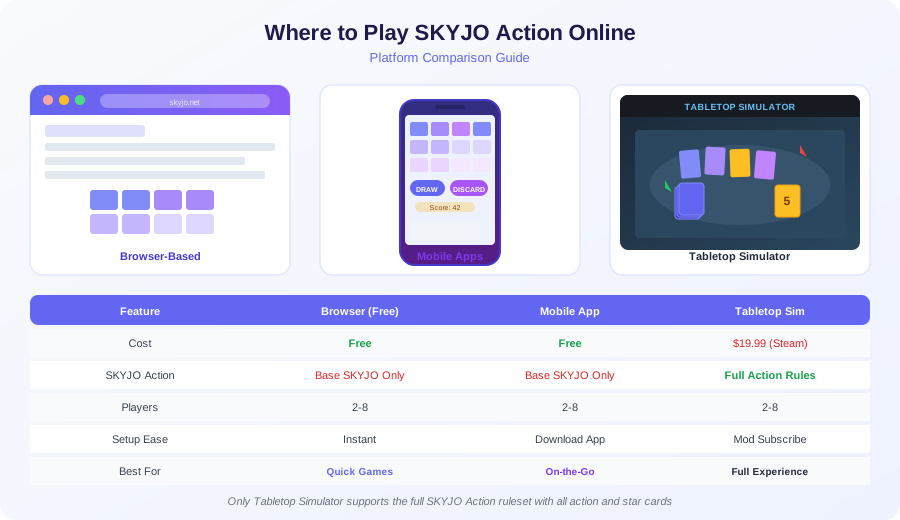
| Platform | Cost | SKYJO Action? | Players | Device | Best For |
|---|---|---|---|---|---|
| Tabletop Simulator | $19.99 (Steam) | Full Rules | 2-8 | PC/Mac | Complete experience |
| skyjo.net | Free | Base SKYJO | 2-8 | Browser | Quick casual games |
| Skyjo-o App | Free | Base SKYJO | 2-8 | iOS/Android | Mobile on-the-go |
| skyjo.online | Free | Base SKYJO | 2-8 | Browser | No signup needed |
| Tabletop Playground | $14.99 (Steam) | Base SKYJO | 2-8 | PC | Lightweight alternative |
Important Note About SKYJO Action Online
As of 2026, Tabletop Simulator is the only platform that supports the full SKYJO Action ruleset including all 9 action cards and star cards. Free browser and mobile options play the base SKYJO game, which is still excellent for learning the core mechanics before graduating to the Action variant.
How to Set Up SKYJO Action on Tabletop Simulator (Step-by-Step)
Tabletop Simulator (TTS) is the gold standard for playing SKYJO Action online with friends. The scripted workshop mod handles card dealing, scoring, and all action card mechanics automatically. Here's how to get started from scratch.
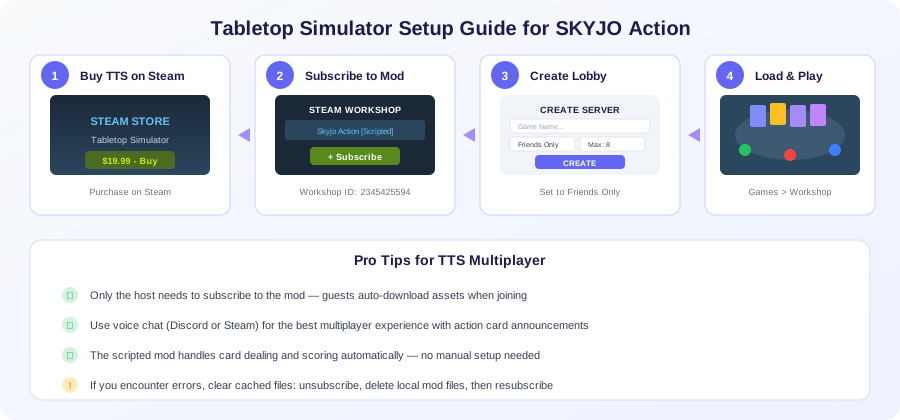
Purchase Tabletop Simulator
- Buy Tabletop Simulator on Steam ($19.99 regular price)
- Frequently goes on sale for 50% off during Steam sales
- Available for Windows, macOS, and Linux
- Only the host needs to own the SKYJO Action mod — guests download assets automatically
Subscribe to the SKYJO Action Mod
- Open Steam Workshop for Tabletop Simulator
- Search for "Skyjo Action Scripted" (Workshop ID: 2345425594)
- Click the green "+ Subscribe" button
- The mod will auto-download and appear in your Games menu
Create a Multiplayer Lobby
- Launch TTS and click "Create" to start a new server
- Set server type to "Friends Only" or use a password
- Set max players (2-8 for SKYJO Action)
- Share your Steam invite link or have friends join via Friends list
Load the Mod and Play
- Go to Games > Workshop and find "Skyjo Action"
- Click Load — the scripted table sets up automatically
- Each player sits at a color-coded seat
- The script handles dealing, flipping, and score tracking
Troubleshooting Tip
If you encounter errors after subscribing to the SKYJO Action mod, try this fix: unsubscribe from the mod, delete any cached local files in your TTS Mods folder, then resubscribe. This resolves most compatibility issues caused by outdated card image files from previous mod versions.
Free Browser & Mobile Options for SKYJO Online
If you want to jump into a game quickly without purchasing software, several free platforms offer the base SKYJO experience online. While these don't include the Action card mechanics, they're perfect for learning core strategies, playing casual games with friends, or practicing before moving to the full Action variant.
skyjo.net
Play SKYJO online directly in your browser with friends or against AI opponents. No download or account required.
- ✓ Instant play — no signup
- ✓ Works on any device with a browser
- ✓ AI opponents available
- ✓ Share link to invite friends
- ✗ Base SKYJO rules only
Skyjo-o App
Full-featured mobile app with online multiplayer, AI practice mode, and global matchmaking for up to 8 players.
- ✓ iOS and Android
- ✓ Play vs world or private rooms
- ✓ Offline AI mode
- ✓ Regular updates (2025-2026)
- ✗ Base SKYJO rules only
skyjo.online
Another browser-based option for playing SKYJO with friends online. Simple interface focused on quick game sessions.
- ✓ No download needed
- ✓ Create private rooms
- ✓ Mobile-friendly design
- ✓ 2-8 players supported
- ✗ Base SKYJO rules only
Pro Tip: Use Free Platforms to Practice
Start with skyjo.net or the Skyjo-o app to master the base SKYJO mechanics — card swapping, column clearing, and score management. These core skills transfer directly to SKYJO Action. Once you're comfortable winning consistently, upgrade to Tabletop Simulator for the full Action experience with star cards and action cards.
SKYJO Action Rules: Quick Reference for Online Play
Before jumping into an online multiplayer session, make sure everyone in your group understands the SKYJO Action rules. Here's a condensed reference covering setup, gameplay, and scoring that you can share with your online opponents.
S Setup
- Separate cards into playing deck (numbers + stars) and action deck
- Shuffle both decks independently
- Deal 12 cards face-down to each player in a 3x4 grid
- Place 4 action cards face-up in the center
- Each player flips 2 cards face-up to start
- Highest total of flipped cards goes first
T Your Turn Options
- Draw from deck — keep it (swap with grid card) or discard it (flip a face-down card)
- Take from discard pile — must swap it with one of your grid cards
- Take an action card — choose from 4 face-up action cards or draw blind
- Play action cards — use any action cards you hold (before or after main action)
★ Star Cards
- Worth 0 points — always safe to keep
- Activation: When flipped face-up, draw an action card from the action deck
- Wildcard: Can match any number in the same row or column for clearing
- Triple bonus: 3 stars in a column = -10 points; 4 stars in a row = -15 points
- No activation on swap: Stars only activate when flipped, not when placed via swap
! Scoring & Round End
- Round ends: When any player has all cards face-up
- Final turn: All other players get one more turn
- Column clear: 3 matching cards in a column are removed (0 points)
- Action card penalty: Unplayed action cards = 10 points each
- Double penalty: If you close the round but don't have the lowest score, your points DOUBLE
- Game over: When any player reaches 100+ total points across all rounds
All 9 Action Cards: How to Use Them in Online Multiplayer
Action cards are what make SKYJO Action's multiplayer so dynamic. Each card creates unique player interactions that don't exist in the base game. Understanding when and how to deploy each one against human opponents is key to winning online sessions.
| Action Card | Effect | Copies | Multiplayer Strategy |
|---|---|---|---|
| Swap Your Own | Swap 2 cards in your grid (face-up or down) | 5 | Rearrange to complete columns faster |
| Double Move | Take another full turn immediately | 5 | Use to race toward round ending |
| Draw Three | Draw 3 cards, keep best one or none | 5 | Great for finding low cards or column matches |
| Enlightenment | Peek at all face-down cards in any row/column | 5 | Spy on opponents' hidden cards for intel |
| Reactivation | Take a card from action discard and use it now | 2 | Recycle powerful discarded action cards |
| Defense | Block any attack card used against you | 3 | Hold to protect your low-scoring grid |
| Swap With Player | Swap 2 cards between any two players | 2 | Give opponents your 12s, take their low cards |
| Action Card Thief | Steal an action card from another player | 2 | Target players hoarding Defense cards |
| Meteor Shower | Force all players to discard a face-up card | 1 | Devastate opponents who've built strong grids |
Beginner Recommendation
For your first few online games, remove the Action Card Thief and Meteor Shower cards from the action deck. These are the most chaotic cards and can be frustrating for new players. Add them back once everyone is comfortable with the other 7 action cards.
Winning Strategies for SKYJO Action Online Multiplayer
Playing against real human opponents online is very different from solo practice. Human players adapt, bluff, and make unpredictable decisions. Here's a comprehensive strategy framework broken into 5 phases to help you dominate every online session.
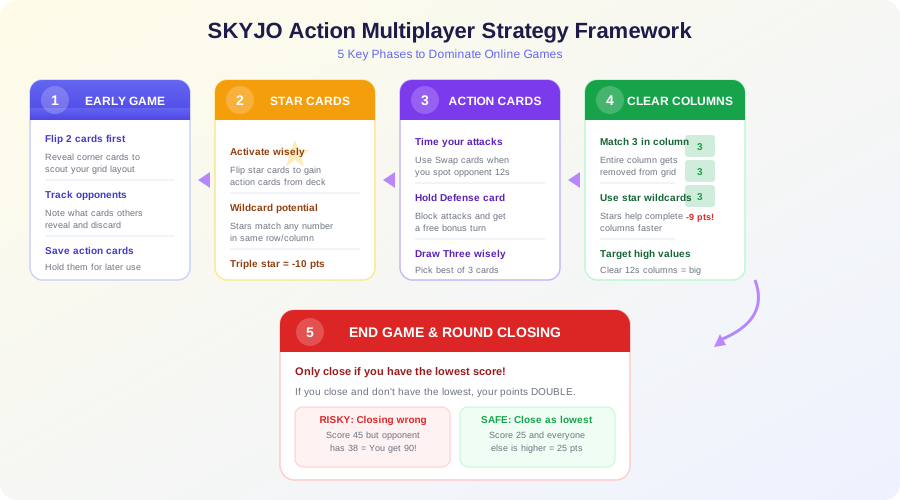
1 Early Game: Information Gathering (Turns 1-3)
What to Do:
- • Flip your 2 starting cards strategically — prefer corners for better grid visibility
- • Watch what cards opponents reveal and discard
- • Note which action cards are face-up in the center
- • Avoid taking action cards too early — focus on your grid first
Multiplayer Insight:
- • Track which players flip high cards — they'll be aggressive swappers
- • If you see an opponent with two 12s showing, prepare Defense cards
- • Players who grab action cards early are planning an aggressive strategy
2 Mid Game: Star Card Activation (Turns 4-8)
What to Do:
- • Flip star cards to gain action cards from the action deck
- • Use stars as wildcards to complete columns for clearing
- • Position stars in columns where you already have matching numbers
- • Three stars in a column gives you -10 bonus points
Multiplayer Insight:
- • When you activate a star, choose face-up action cards that counter opponents' strategies
- • If the leading player has Defense, grab Action Card Thief
- • Pick Enlightenment to spy on the player closest to ending the round
3 Action Card Deployment: Timing Is Everything
Offensive Plays:
- • Swap With Player: Target opponents with visible low cards (0, -1, -2)
- • Meteor Shower: Use when multiple opponents have strong visible grids
- • Action Card Thief: Steal Defense cards before launching attacks
- • Enlightenment: Peek at the leading player's hidden cards
Defensive Plays:
- • Defense: Hold until attacked — blocking gives you a bonus turn
- • Swap Your Own: Rearrange to complete columns before opponents end round
- • Draw Three: Use when you need a specific low card urgently
- • Double Move: Save for critical moments near round end
4 Column Clearing: The Point Elimination Engine
Clearing columns (3 matching cards vertically) is the single most powerful scoring mechanism in SKYJO Action. In multiplayer, this is your primary path to victory.
HIGH VALUE CLEAR
Clear three 12s = remove 36 points from your score
STAR WILDCARD
Star + two 5s in a column = cleared (only 0 + 10 removed)
USE SWAP YOUR OWN
Rearrange cards to align matching numbers vertically
5 End Game: The Double Penalty Trap
Critical rule: If you end the round (flip your last card) but don't have the lowest score among all players, your points for that round are doubled. This is the most important strategic consideration in multiplayer.
When NOT to End the Round:
- • You can see opponents with very low visible scores
- • Opponents still have many face-down cards (unknown risk)
- • You're holding unplayed action cards (10 points each)
- • Your score estimate is close to others' visible totals
When to End the Round:
- • Your visible score is clearly the lowest at the table
- • You've cleared multiple columns and have few points left
- • Opponents are showing high cards (10, 11, 12) they can't fix
- • You have no unplayed action cards adding penalty points
Advanced Online Multiplayer Tips & Tactics
Once you've mastered the basics, these advanced tactics will separate you from casual players in online sessions. These strategies exploit the unique dynamics of playing against real humans rather than AI.
Reading Your Opponents
- Track discard patterns: Players who discard middle-value cards (4-7) are hunting for extremes — either very low cards or column matches.
- Watch action card choices: A player who grabs Swap With Player is targeting someone. If they're looking at your grid, prepare your Defense card.
- Speed of play: In real-time online games, players who pause before discarding often have a tough decision — they may be holding a risky hand.
- Count revealed cards: Track how many face-up cards each opponent has. The player closest to flipping all cards is about to end the round.
Bluffing & Misdirection
- Visible Defense deterrent: Even holding a Defense card visibly discourages attacks, saving it without using it.
- Slow-roll your score: Keep some low cards face-down longer to appear weaker than you are, making opponents less likely to target you.
- Feign aggression: Grab offensive action cards early to make opponents waste their Defense cards, then play conservatively.
- Strategic reveals: Flip high-value cards early to seem like a non-threat, then quietly build column matches for massive point removal.
Adjusting for Player Count
- 2-3 players: Aggressive play works well. Fewer targets for attack cards means more focused disruption. End rounds quickly when ahead.
- 4-5 players: Balanced approach. Action cards spread thin, so timing attacks is critical. Column clearing becomes more important than attacks.
- 6-8 players: Defensive play dominates. Rounds take longer, giving more time to build perfect grids. Avoid drawing attention early. Meteor Shower becomes devastating.
Online Communication Tips
- Use voice chat: Discord or Steam voice makes action card announcements clearer and faster than text.
- Announce actions clearly: Say which action card you're playing and who it targets to avoid confusion in TTS.
- Set house rules upfront: Agree on time limits per turn, which action cards to include, and how to handle disconnects.
- Take turns deliberately: Don't rush — online play removes the social pressure of in-person games, so use your time to think.
SKYJO Action vs Base SKYJO: Which Should You Play Online?
If you're new to SKYJO games online, you might wonder whether to start with the base game or jump straight into SKYJO Action. Here's a detailed comparison to help you decide.
| Aspect | Base SKYJO Online | SKYJO Action Online |
|---|---|---|
| Complexity | Simple — draw, swap, or flip | Medium — adds action cards + star cards |
| Player Interaction | Low — indirect competition only | High — attacks, swaps, theft between players |
| Game Length | 20-30 minutes | 30-45 minutes |
| Luck vs Skill | 60% luck, 40% skill | 45% luck, 55% skill |
| Online Availability | Multiple free platforms | Tabletop Simulator (paid) |
| Best For | Casual sessions, beginners, families | Competitive play, experienced groups |
| Replayability | Good — simple but engaging | Excellent — action cards create unique games |
Our Recommendation
Start with base SKYJO online (free on skyjo.net) to learn core mechanics. Once your group can consistently play without checking rules, move to SKYJO Action on Tabletop Simulator for the full competitive multiplayer experience. The action cards add a whole new layer of strategy that makes every game unique.
Pros & Cons of Playing SKYJO Action Online
✓ Advantages
- ● Play anywhere: Connect with friends across the world without needing the physical card game
- ● Automated scoring: TTS scripted mods handle point calculation and column clearing automatically
- ● Easy to learn: Digital interfaces guide new players through valid moves and card interactions
- ● No card wear: Play unlimited sessions without wearing out physical cards
- ● Quick setup: No shuffling, dealing, or cleanup — start playing in seconds
- ● Flexible scheduling: Play asynchronously or schedule real-time sessions across time zones
- ● Customizable rules: Easily add or remove action cards to match your group's skill level
✗ Disadvantages
- ● Full Action rules require purchase: Tabletop Simulator costs $19.99 (free options only have base SKYJO)
- ● Less social atmosphere: Online play misses the table-talk energy and physical card handling of in-person games
- ● Technical issues: TTS mods can occasionally have compatibility bugs after updates
- ● Learning curve for TTS: Tabletop Simulator's interface takes some getting used to for non-gamers
- ● Internet dependency: Requires stable connection for all players — lag can disrupt gameplay
- ● No official digital version: Magilano hasn't released an official SKYJO Action app yet
- ● PC only for full rules: TTS isn't available on mobile, limiting where you can play the Action variant
How to Host a SKYJO Action Online Game Night
Organizing a successful online SKYJO Action session requires a bit of preparation. Here's a checklist to ensure smooth gameplay for everyone in your group.
Pre-Game Checklist
For the Host:
- ☐ Ensure Tabletop Simulator is updated to latest version
- ☐ Verify the SKYJO Action mod is subscribed and loading correctly
- ☐ Test-load the mod before guests arrive
- ☐ Set up Discord or Steam voice channel
- ☐ Decide which action cards to include (all 9 or beginner set of 7)
- ☐ Set server to "Friends Only" with password if needed
For All Players:
- ☐ Install Tabletop Simulator (guests don't need the mod)
- ☐ Read the rules summary or watch a tutorial video
- ☐ Test microphone and audio for voice chat
- ☐ Close unnecessary background applications for performance
- ☐ Have the action card reference sheet open in another tab
- ☐ Agree on time limit per turn (30-60 seconds recommended)
Recommended House Rules for Online Play
Turn Timer
Set a 45-second turn limit to keep games flowing. Use a shared online timer or honor system via voice chat.
Disconnect Policy
If a player disconnects, pause for 2 minutes. If they don't return, their cards remain face-down for the round.
Action Card Announcements
Players must announce which action card they're playing and its target before executing. This prevents confusion.
Frequently Asked Questions: SKYJO Action Online Multiplayer
Can I play SKYJO Action online for free? ▼
The full SKYJO Action experience (with action cards and star cards) is currently only available through Tabletop Simulator on Steam ($19.99). However, you can play the base SKYJO game for free on platforms like skyjo.net, skyjo.online, and the Skyjo-o mobile app. The base game shares the same core mechanics — card swapping, column clearing, and score minimization — making it excellent practice for the Action variant.
How many players can play SKYJO Action online at once? ▼
SKYJO Action supports 2-8 players per game, both in the physical card game and online through Tabletop Simulator. For the best online experience, we recommend 3-5 players. With 2 players, games can feel too predictable. With 6-8 players, rounds take longer and the table can get chaotic, though this can be exciting for experienced groups.
Do all players need to buy Tabletop Simulator? ▼
Yes, all players need to own Tabletop Simulator on Steam. However, only the host needs to subscribe to the SKYJO Action workshop mod. When other players join the host's game, the mod assets (card images, scripts, etc.) download automatically. TTS frequently goes on sale for 50% off during Steam seasonal sales, so watch for deals if your whole group needs to buy it.
What's the difference between SKYJO and SKYJO Action? ▼
SKYJO Action adds two major elements to the base game: Star Cards (wild cards worth 0 points that can match any number in their row/column and activate action card draws) and an Action Card Deck (30 cards across 9 types that let you swap cards with opponents, peek at hidden cards, take extra turns, block attacks, and more). The core goal remains the same — achieve the lowest score — but the action cards add significant player interaction and strategic depth.
Is there an official SKYJO Action mobile app? ▼
As of 2026, Magilano (the publisher of SKYJO) has not released an official SKYJO Action mobile app. The Skyjo-o app and other mobile options implement the base SKYJO rules only. For the full Action experience online, Tabletop Simulator on PC remains the only option. We'll update this guide if an official app is released.
How long does an online SKYJO Action game take? ▼
A full game of SKYJO Action (playing until someone reaches 100 points) typically takes 30-45 minutes with 3-4 players online. Individual rounds last 8-15 minutes depending on how quickly players make decisions. Online games may run slightly longer than in-person due to interface navigation and communication overhead. With 6-8 players, expect games to last 45-60 minutes.
What happens if I get disconnected during an online game? ▼
In Tabletop Simulator, if you disconnect, your cards remain on the table in their current state. You can rejoin the same server using the host's invite link or through your Steam friends list. The game state is preserved as long as the host's server remains running. We recommend setting a 2-minute pause rule — if a player disconnects and doesn't return within 2 minutes, continue playing without them for that round.
Can I play SKYJO Action online on Mac or Linux? ▼
Yes! Tabletop Simulator is available for Windows, macOS, and Linux through Steam. The SKYJO Action workshop mod works on all three platforms without any additional configuration. For the free browser-based options (base SKYJO only), any operating system with a modern web browser will work, including ChromeOS and tablets.
What's the best strategy for winning SKYJO Action multiplayer? ▼
The most consistent winning strategy is: (1) Focus on clearing columns with matching numbers — this removes points entirely from your score. (2) Use star cards as wildcards to complete columns faster. (3) Hold a Defense card to protect your low-scoring grid from attack cards. (4) Only end the round when you're confident you have the lowest score — the double penalty for closing wrong is devastating. (5) Track opponents' visible scores and plan your end-game timing accordingly.
Is SKYJO Action available on Board Game Arena? ▼
No, neither the base SKYJO nor SKYJO Action is currently available on Board Game Arena (BGA). While BGA has over 1,280 board games available for free online play, SKYJO is not among them as of 2026. The best alternatives are skyjo.net for browser-based base SKYJO or Tabletop Simulator for the full SKYJO Action experience.
Ready to Play SKYJO Action Online?
Gather your friends, choose your platform, and start competing. Whether you're playing the free base SKYJO or the full Action experience on Tabletop Simulator, the fun of strategic card play awaits.
Start with free online SKYJO to practice, then upgrade to the physical card game or Tabletop Simulator for the full Action experience.

Loading comments...