Play SKYJO Action Online Free: Complete Guide to Digital Platforms
Everything you need to start playing SKYJO Action online today. Discover the best free platforms, mobile apps, browser games, and multiplayer options — plus tips for winning your first digital matches.
Quick Facts: Playing SKYJO Action Online
| Feature | Details |
|---|---|
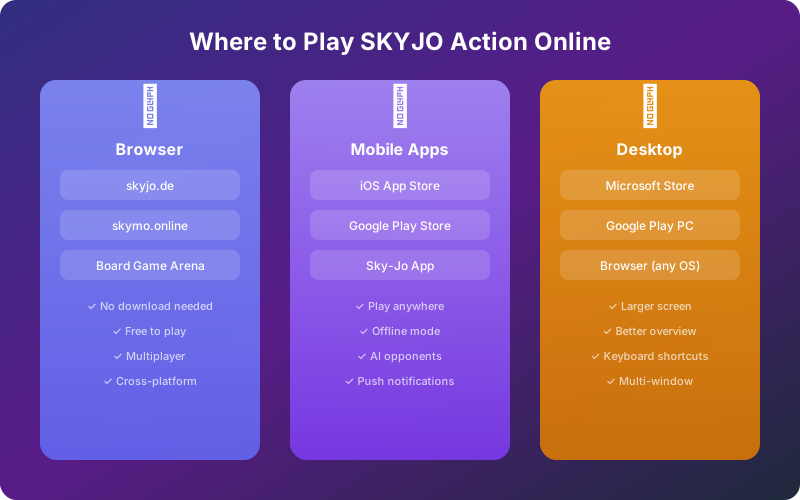
| Best Free Platform | skyjo.de (browser-based, no download) |
| Mobile Apps | iOS App Store & Google Play (Sky-Jo app) |
| Players Online | 2-8 players per game |
| Cost | Free (with optional premium features) |
| Game Modes | Classic, Action, Quick Match, Private Rooms |
| Account Required | Optional (guest play available on most platforms) |
| Devices Supported | PC, Mac, iPhone, iPad, Android, Tablet |
| Offline Play | Yes (mobile apps with AI opponents) |
Can You Play SKYJO Action Online for Free?
SKYJO Action is the enhanced version of the beloved SKYJO card game, adding action cards, star cards, and deeper strategic elements to the classic formula. The great news is that you can now enjoy SKYJO Action online without spending a penny — whether you prefer playing in your browser, on your phone, or on a desktop app.
While the original physical card game by Magilano remains hugely popular (it is one of the best-selling card games on Amazon), the digital versions have opened up SKYJO Action to a global audience. You can play against friends in private rooms, challenge random opponents in quick matches, or practice against AI to sharpen your strategy — all for free.
SKYJO Action adds 30 action cards across 9 unique types plus star cards to the classic SKYJO gameplay. Online platforms let you toggle between classic and Action modes, so you can learn the basics before diving into the full Action experience.
In this comprehensive guide, we cover every platform where you can play SKYJO Action online for free. We compare browser-based options, mobile apps, and desktop clients. We also walk you through step-by-step setup instructions, share beginner tips for winning online games, and explain how SKYJO Action differs from classic SKYJO so you know exactly what to expect when you start your first digital match.
Best Free Platforms to Play SKYJO Action Online
Several platforms let you play SKYJO and SKYJO Action online without paying anything. Each has its own strengths — some excel at browser-based play, while others offer polished mobile experiences. Here is a breakdown of the best options available right now.
TOP PICK skyjo.de — Official Browser Game
skyjo.de is the go-to destination for playing SKYJO online in your browser. This web-based platform requires no download, no installation, and works on any device with a modern browser. Simply visit the website, create a room or join an existing one, and you are ready to play.
- ✓ No download or installation required
- ✓ Works on all browsers (Chrome, Firefox, Safari, Edge)
- ✓ Create private rooms with shareable links
- ✓ Real-time multiplayer with 2-8 players
- ✓ Mobile-responsive design
skymo.online — Dedicated SKYJO Community
skymo.online is a dedicated community platform built specifically for SKYJO enthusiasts. It offers ranked matches, player profiles, and a competitive leaderboard that lets you track your progress against other players worldwide.
- ✓ Ranked competitive matches
- ✓ Player profiles and statistics
- ✓ Global leaderboard
- ✓ Active community of players
- ✓ Free sign-up with email
Sky-Jo Mobile App — iOS & Android
The Sky-Jo mobile app is available for free on both the Apple App Store and Google Play Store. It is one of the most popular SKYJO digital implementations, offering both online multiplayer and offline play against AI opponents. The app features smooth touch controls optimized for phone and tablet screens.
- ✓ Free to download and play
- ✓ Offline mode with AI opponents
- ✓ Online multiplayer matchmaking
- ✓ Touch-optimized interface
- ✓ Play on the go — anywhere, anytime
Microsoft Store — Windows Desktop App
For Windows users, there is a dedicated SKYJO app on the Microsoft Store. This desktop application provides a full-screen card game experience with online multiplayer capabilities. The larger screen real estate makes it easier to see your entire 3x4 card grid and track opponents' cards at the same time.
Google Play Games for PC
Through Google Play Games for PC, you can run the Android version of Sky-Jo directly on your Windows computer. This gives you the familiar mobile app experience on a larger screen, complete with keyboard and mouse support. Your progress syncs with your mobile device, so you can switch between phone and PC seamlessly.
Platform Comparison: Which One Should You Choose?
| Platform | Price | Action Mode | Multiplayer | AI Play | No Download | Best For |
|---|---|---|---|---|---|---|
| skyjo.de | Free | Yes | Yes | Yes | Yes | Quick browser play |
| skymo.online | Free | Yes | Yes | Yes | Yes | Ranked competitive |
| Sky-Jo iOS App | Free | Yes | Yes | Yes | No | iPhone/iPad |
| Sky-Jo Android | Free | Yes | Yes | Yes | No | Android phones/tablets |
| Microsoft Store | Free | Yes | Yes | Yes | No | Windows desktop |
| Google Play PC | Free | Yes | Yes | Yes | No | PC + mobile sync |
* All platforms listed are free to play. Some may include optional in-app purchases or ads.
How to Play SKYJO Action Online: Step-by-Step Guide
Getting started with SKYJO Action online is straightforward. Whether you choose a browser platform or a mobile app, you can be playing your first game within minutes. Follow these steps to get started on any platform.
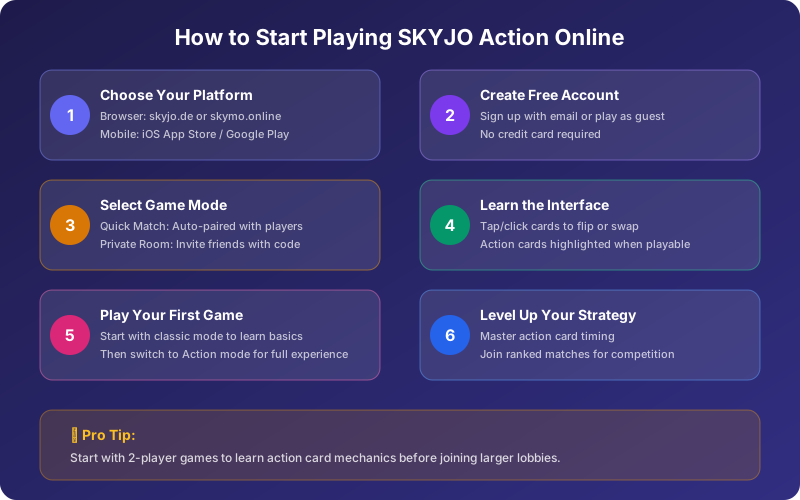
1 Choose Your Platform
Start by deciding how you want to play. For the fastest experience with zero setup, choose a browser-based platform like skyjo.de. If you want to play on the go, download the Sky-Jo app from your phone's app store.
Recommendation: If this is your first time playing SKYJO Action online, start with skyjo.de in your browser. No account needed, and you can jump straight into a game.
2 Create or Join a Game Room
Most platforms offer two options: create a private room and share the link or code with friends, or join a public quick match to be paired with random opponents. Private rooms are great for playing with people you know, while quick matches let you find a game in seconds.
Share room code with friends
Auto-paired with online players
3 Select SKYJO Action Mode
Once your room is set up, make sure to select SKYJO Action mode (not classic SKYJO). This enables the action card deck, star cards, and all the extra mechanics that make SKYJO Action unique. Some platforms may label this as "Action Mode" or "Extended Rules."
Tip: If you are new to SKYJO entirely, play a few rounds in Classic mode first to learn the basics. Then switch to Action mode once you are comfortable with drawing, swapping, and column-clearing mechanics.
4 Learn the Digital Interface
The digital interface streamlines many aspects of the physical game. Cards are arranged in your 3x4 grid automatically. On your turn, you can tap or click to draw from the draw pile or discard pile. When you have action cards in hand, they will be highlighted when they are playable.
- • Click/tap a face-down card to flip it
- • Click/tap the draw pile to draw a new card
- • Drag and drop to swap cards into your grid
- • Action cards glow when you can play them
- • Timer shows how long you have for your turn
5 Play Your First Game
Your cards are automatically dealt and arranged. Two cards are flipped face-up to start. On each turn, draw from the deck or discard pile, then decide whether to swap a card into your grid or discard. When you activate a star card, you get to pick an action card from the four face-up options or draw blindly from the action deck. The round ends when one player has all 12 cards face-up. The player with the lowest total score wins the round. The overall game ends when someone reaches 100 points — the player with the lowest cumulative score wins.
SKYJO Action vs Classic SKYJO: What Changes Online?
If you are already familiar with classic SKYJO, you might wonder what exactly changes when you switch to SKYJO Action mode online. The core gameplay remains the same — 3x4 card grid, lowest score wins, column-clearing mechanic — but the Action variant introduces powerful new elements that add strategic depth and player interaction.
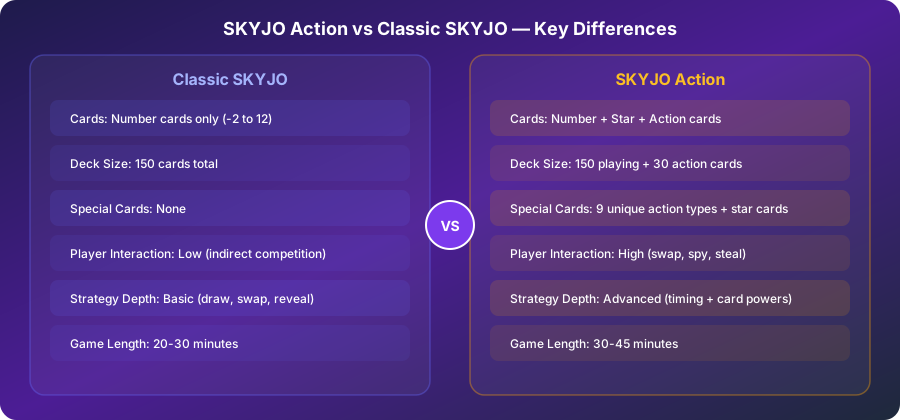
Key Differences in SKYJO Action Online
Star Cards
Star cards are mixed into the regular playing deck. When you reveal or activate a star card, you earn the right to pick an action card. Star cards act as jokers (0 points) and can substitute for any number when forming column matches. Online, the interface highlights star cards with a golden glow to make them easy to spot.
Action Cards
There are 30 action cards across 9 types, including Swap Your Own, Double Move, Draw Three, Enlightenment, Reactivation, Defense, Swap With Player, Action Card Thief, and Meteor Shower. Each has a unique ability that can swing the game in your favor. In the digital version, action card effects are animated and resolved automatically.
10-Point Penalty
Unplayed action cards in your hand count as 10 points each at the end of a round. This creates a strategic tension: collecting powerful action cards is tempting, but holding too many can devastate your score. The online interface shows your potential penalty clearly.
Higher Player Interaction
Classic SKYJO is largely a solo puzzle where you optimize your own grid. SKYJO Action changes this with cards that let you spy on, swap with, or steal from opponents. Online play handles all these interactions automatically, with smooth animations showing cards moving between players.
The official SKYJO Action rules recommend removing the Action Card Thief and Meteor Shower cards for your first few games. Many online platforms let you customize which action cards are included, so look for a "Beginner Mode" or rule customization option.
SKYJO Action Rules: Quick Reference for Online Play
Before jumping into your first online game of SKYJO Action, here is a quick reference of the essential rules. The digital platforms handle the mechanics automatically, but understanding the rules will make you a much more effective player.
Setup (Handled Automatically Online)
- 1 Each player receives 12 cards dealt face-down, arranged in a 3x4 grid.
- 2 The remaining playing cards form the draw pile. One card is flipped to start the discard pile.
- 3 The action card deck (30 cards) is shuffled separately. Four action cards are placed face-up for all players to see.
- 4 Each player flips 2 cards face-up in their grid. The player with the highest total of their two visible cards goes first.
Your Turn: Three Options
Draw from Discard Pile
Take the top card from the discard pile. You must swap it with one of your grid cards (face-up or face-down). The replaced card goes to the discard pile.
Draw from Draw Pile
Draw the top card from the draw pile. Look at it privately. Either swap it with a grid card, or discard it and flip one face-down card face-up.
Play an Action Card
If you have action cards in hand, play one before or after your main action. Each action card has a unique effect (swap, peek, steal, etc.).
All 9 Action Card Types
| Action Card | Copies | Effect |
|---|---|---|
| Swap Your Own | 5 | Swap the positions of two cards in your own grid |
| Double Move | 5 | Take a second turn immediately after this one |
| Draw Three | 4 | Draw 3 cards from the draw pile, keep one, discard two |
| Enlightenment | 4 | Look at up to 2 of your own face-down cards |
| Reactivation | 3 | Activate any face-up star card again to get another action card |
| Defense | 3 | Block any action card played against you |
| Swap With Player | 3 | Swap one of your cards with one of an opponent's cards |
| Action Card Thief | 2 | Steal a random action card from another player's hand |
| Meteor Shower | 1 | All players discard their entire action card hand |
Scoring
Point Values
- Number cards: Face value (-2 to 12)
- Star cards: 0 points (joker/wild)
- Unplayed action cards: 10 points each
End of Round
- Round ends when one player reveals all 12 cards
- If that player does NOT have the lowest score, their score is doubled
- Complete columns of matching numbers are removed (0 points)
- Game ends when any player reaches 100 points
Winning Strategies for SKYJO Action Online
Playing SKYJO Action online has some strategic nuances that differ from the physical card game. The digital environment adds time pressure with turn timers, removes the ability to read physical body language, and makes it easier to track card values. Here are the best strategies to help you climb the leaderboards.
Beginner Strategies
Prioritize Low Cards and Column Matches
Your primary goal is still to minimize your score. Focus on swapping high-value cards (8-12) with low ones (-2, -1, 0, 1, 2). When you can create a column of three matching numbers, the entire column is discarded for 0 points — even if those cards are high-value. This is the single most powerful scoring mechanic in the game.
Play Action Cards Quickly
Remember that unplayed action cards cost you 10 points each at the end of a round. Do not hoard them. Play action cards as soon as they are useful, even if the effect is modest. A mediocre Swap Your Own is better than holding the card for a perfect moment that might never come before the round ends.
Use Enlightenment Early
The Enlightenment action card lets you peek at your face-down cards. Play this as early as possible — knowing your hidden card values informs every subsequent decision. You might discover a card that is already contributing to a column match, or a high-value card that needs to be replaced urgently.
Advanced Strategies
Weaponize Swap With Player
The Swap With Player card is most powerful in the late game. When an opponent is about to complete a column match, swap one of your high-value cards into their column to break it. Online platforms show all face-up cards clearly, making it easy to identify which opponent columns are close to completing. This is SKYJO Action's most disruptive and strategic card.
Time Your Round Endings
In online play, you can see all opponents' visible cards. Before revealing your last face-down card (which ends the round), calculate whether you truly have the lowest score. If you end the round without the lowest score, your total is doubled. Use the digital interface to count visible points across all players before making this decision.
Hold Defense for Critical Moments
Unlike other action cards, Defense is worth keeping in hand until an opponent targets you. The 10-point penalty for holding it is worth it if it blocks a devastating Swap With Player or Meteor Shower that would cost you more than 10 points. Only play Defense reactively — never discard it just to avoid the penalty.
Use Star Cards Strategically
Star cards are worth 0 points and act as wildcards for column matches. When you draw a star card, consider placing it in a column that already has two matching numbers — the star card completes the match and the entire column is removed. This effectively gives you a "free" column clear while also granting you an action card pick.
Online-Specific Tips
Online games have turn timers. Plan your moves during opponents' turns so you can act quickly when it is your turn.
The digital interface shows all players' grids. Use this advantage to count points and identify threats before making decisions.
Practice against AI opponents to learn action card timing without the pressure of a live opponent's turn timer.
Some platforms offer game history. Review completed games to identify where you made good or bad decisions.
Playing SKYJO Action on Mobile: iOS & Android Guide
The mobile apps are the most convenient way to play SKYJO Action on the go. Available for free on both the App Store and Google Play, the Sky-Jo app brings the full card game experience to your phone or tablet with optimized touch controls and smooth animations.
How to Download and Install
iPhone & iPad
- 1. Open the App Store on your device
- 2. Search for "Sky-Jo"
- 3. Tap Get to download (free)
- 4. Open the app and choose Classic or Action mode
- 5. Play against AI or online opponents
Phone & Tablet
- 1. Open Google Play Store
- 2. Search for "Sky-Jo" or "SKYJO"
- 3. Tap Install (free)
- 4. Open app and select game mode
- 5. Start playing immediately
Mobile App Features
Classic SKYJO, SKYJO Action, Quick Match, Private Rooms, and AI practice
Get notified when it is your turn in asynchronous games or when friends invite you
Play against AI opponents without an internet connection — perfect for travel
Track your win rate, average score, best rounds, and improvement over time
Available in English, German, French, Spanish, and more languages
Add friends, send game invites, and chat during matches
Playing SKYJO Action in Your Browser: No Download Needed
Browser-based SKYJO Action is the fastest way to start a game. No downloading, no installing, no creating an account — just open your browser, navigate to a platform, and play. This makes browser play ideal for quick sessions during breaks, playing on shared or work computers, or when you do not want to install anything.
Step-by-Step: Playing on skyjo.de
-
1
Open your browser — Chrome, Firefox, Safari, or Edge all work. Navigate to skyjo.de.
-
2
Enter your name — You do not need an account. Just type a display name to identify yourself in the game.
-
3
Create or join a room — Click "Create Room" to get a shareable link for friends, or "Join Room" and enter a room code. You can also click "Quick Match" to be paired with other online players.
-
4
Select Action mode — In the room settings, toggle the game mode from Classic to SKYJO Action. This adds the action card deck and star cards.
-
5
Start playing — Once all players have joined, the host clicks "Start Game." Cards are dealt automatically, and the interface guides you through each turn.
Browser Compatibility
| Browser | Desktop | Mobile | Notes |
|---|---|---|---|
| Chrome | Full support | Full support | Recommended for best performance |
| Firefox | Full support | Full support | Great performance |
| Safari | Full support | Full support | Best choice on Mac/iOS |
| Edge | Full support | Full support | Chromium-based, same as Chrome |
SKYJO Action Multiplayer: Play with Friends Online
One of the best things about playing SKYJO Action online is the ability to play with friends who are not in the same room. Whether your gaming group is spread across different cities or you want to organize a virtual game night, online multiplayer makes it easy to connect and play together.
How to Set Up a Private Game with Friends
Create a Room
Go to your preferred platform and click "Create Room" or "Host Game." Choose SKYJO Action as the game mode and set the player count (2-8).
Share the Invite
Copy the room link or code and share it with your friends via text, email, or messaging app. They can join by clicking the link or entering the code.
Start Playing
Once everyone has joined the room, the host clicks "Start." All cards are dealt automatically and you are ready to play SKYJO Action together.
Multiplayer Game Modes
CASUAL Private Room
Invite-only games with friends. You control the player count, game rules, and which action cards are included. Perfect for game nights and learning SKYJO Action with a patient group. No time pressure or ranking consequences.
COMPETITIVE Quick Match
Matched with random opponents of similar skill. Turn timers keep the game moving. Your results affect your ranking and position on the leaderboard. Best for players who have learned the rules and want a challenge.
PRACTICE vs. AI
Play against computer opponents at various difficulty levels. No internet needed on mobile apps. Ideal for learning action card mechanics, testing strategies, and building confidence before going online.
TOURNAMENT Ranked
Available on some platforms. Compete in structured tournaments with multiple rounds. Earn points toward seasonal leaderboards and climb through ranking tiers for bragging rights and exclusive badges.
Pros & Cons of Playing SKYJO Action Online
✓ Advantages
-
✓
Free to Play
No need to buy the physical game ($15-20). All platforms offer free access to the core SKYJO Action experience.
-
✓
Play Anytime, Anywhere
No need to gather people in one room. Play during commutes, on lunch breaks, or late at night with opponents worldwide.
-
✓
Automatic Rule Enforcement
No rule disputes. The digital platform enforces all rules perfectly, handles scoring automatically, and prevents illegal moves.
-
✓
Faster Games
No time spent shuffling, dealing, or counting scores. Online games are typically 30-50% faster than physical games.
-
✓
Practice Against AI
Improve your skills without pressure. AI opponents let you experiment with strategies and learn action card timing.
-
✓
Global Player Pool
Always find opponents online, even at odd hours. Play with people from around the world and experience different play styles.
✗ Disadvantages
-
✗
Missing Social Element
Card games are best enjoyed in person with laughter and conversation. Online play can feel less social despite chat features.
-
✗
Ads in Free Versions
Most free apps include advertisements. Some display ads between rounds, which can interrupt the flow of a session.
-
✗
Internet Required for Multiplayer
Online multiplayer requires a stable internet connection. Disconnections can disrupt games and frustrate other players.
-
✗
Turn Timers Add Pressure
Quick match games enforce time limits per turn, which can feel stressful for new players learning action card mechanics.
-
✗
No Physical Card Feel
Some players miss the tactile satisfaction of holding and flipping physical cards. Digital cannot fully replicate this experience.
-
✗
Platform Fragmentation
Players on different platforms cannot always play together. Check that your friends use the same platform before creating a room.
SKYJO Action Online for Beginners: Getting Started Guide
If you have never played SKYJO before — or you know classic SKYJO but are new to the Action variant — this section walks you through everything you need to know before your first online game. SKYJO Action is beginner-friendly, and the digital platforms make learning even easier with tutorials, tooltips, and automatic rule enforcement.
First Steps for Complete Beginners
Start with Classic Mode
Before jumping into SKYJO Action, play 3-5 rounds of Classic SKYJO online. This teaches you the fundamental mechanics: drawing cards, swapping cards into your grid, flipping face-down cards, and clearing matching columns. All of these mechanics carry over to SKYJO Action.
Learn the Goal
Your goal in every round is simple: have the lowest total score. Low-value and negative cards are good. High-value cards are bad. Matching three of the same number in a column removes that column entirely (0 points). The game ends when someone reaches 100 points, and the player with the lowest cumulative score across all rounds wins.
Switch to Action Mode
Once comfortable with classic rules, enable Action mode. For your first Action games, use "Beginner Mode" if available, which removes the two most complex action cards (Action Card Thief and Meteor Shower). Play against AI to practice without pressure.
Master One Action Card at a Time
Do not try to learn all 9 action cards at once. Focus on understanding the simplest ones first: Swap Your Own (rearrange your grid), Enlightenment (peek at hidden cards), and Double Move (extra turn). These three appear most frequently and have the most straightforward effects.
Join Online Multiplayer
Once you are confident with AI games, join a private room with friends or try quick match. The transition from AI to human opponents introduces new strategic dimensions — real players are less predictable and more creative with their action card usage.
Common Beginner Mistakes to Avoid
Each unplayed action card costs 10 points. Play them quickly.
If you do not have the lowest score, your total is doubled.
Matching three numbers in a column removes them — this is the best scoring mechanic.
Online shows all face-up cards. Use this information to make better decisions.
Online vs Physical SKYJO Action: Which Is Better?
Both versions have their place. The digital version offers convenience, speed, and global multiplayer, while the physical card game provides a richer social experience. Here is how they compare across key factors.
| Factor | Online (Digital) | Physical (Card Game) |
|---|---|---|
| Cost | Free | $15-20 |
| Setup Time | Instant (automatic) | 2-3 minutes (shuffle & deal) |
| Finding Players | Global matchmaking | Need people in the same room |
| Social Experience | Limited (chat/voice) | Rich (face-to-face) |
| Rule Enforcement | Automatic, no disputes | Manual, possible confusion |
| Score Tracking | Automatic | Manual with pen & paper |
| Game Speed | Faster (no shuffling) | Slower (physical handling) |
| Tactile Experience | None (digital) | Satisfying card handling |
| Portability | Any device, anywhere | Need to carry the box |
Play SKYJO Action online first to learn the rules for free, then buy the physical game for in-person game nights. The digital version is perfect for practicing, finding opponents, and playing on the go. The physical version is unbeatable for family gatherings and social events.
Troubleshooting: Common Issues When Playing Online
Game is lagging or disconnecting
Check your internet connection. Browser-based games work best on Wi-Fi or a stable cellular connection. Close other bandwidth-heavy tabs or apps. If the issue persists, try switching to a different browser or refreshing the page.
Cannot find friends' room
Make sure you and your friends are on the same platform. Room codes are case-sensitive on some platforms. If using a room link, make sure the link is complete and not truncated by your messaging app. Try having the host regenerate the room code.
Action cards not appearing
You may be playing in Classic mode instead of Action mode. Check the room settings before starting the game and make sure "SKYJO Action" or "Action Mode" is selected. In Classic mode, there are no action cards or star cards.
App crashing on mobile
Make sure your app is updated to the latest version. Clear the app cache in your phone's settings. If crashes continue, uninstall and reinstall the app. Ensure your device meets the minimum OS requirements (iOS 13+ or Android 8+).
Turn timer running out too fast
In private rooms, the host can often adjust the turn timer length. Ask the host to increase it for beginner players. In quick match, practice planning your moves during other players' turns so you can act quickly when it is your turn.
Frequently Asked Questions
Is SKYJO Action really free to play online? ▼
Yes. Browser platforms like skyjo.de and skymo.online are completely free with no purchase required. The mobile apps (iOS and Android) are also free to download, though they include ads. Some platforms offer optional premium features (ad removal, custom themes) for a small fee, but the core SKYJO Action gameplay is always free.
Can I play SKYJO Action online without creating an account? ▼
Yes, on browser platforms like skyjo.de you can play as a guest with just a display name. Mobile apps may require a basic account for online multiplayer features, but you can typically play offline against AI without an account. For ranked competitive play on skymo.online, you will need a free account.
What is the difference between SKYJO Action and regular SKYJO online? ▼
Classic SKYJO uses only number cards (-2 to 12). SKYJO Action adds two new card types: Star cards (wild cards worth 0 points that let you pick action cards) and Action cards (30 cards across 9 types with special abilities like swapping, peeking, stealing, and blocking). SKYJO Action has more player interaction, deeper strategy, and slightly longer game time.
How many players can play SKYJO Action online? ▼
SKYJO Action supports 2 to 8 players, both online and in the physical card game. Most online platforms support the full player range, though 2-4 player games are the most common for quick matches. Private rooms can accommodate up to 8 players for larger game nights.
Can I play SKYJO Action offline on my phone? ▼
Yes. The Sky-Jo mobile app (available on iOS and Android) includes an offline mode where you can play against AI opponents. This is perfect for practicing on planes, trains, or anywhere without internet. Your offline games still count toward your personal statistics.
How long does an online SKYJO Action game take? ▼
An online game of SKYJO Action typically takes 20-40 minutes for a full game (multiple rounds until someone reaches 100 points). Individual rounds take 5-10 minutes. Online games tend to be faster than physical games because dealing, shuffling, and scoring are all handled automatically. With 2 players, games are shorter; with 6-8 players, expect the upper end of that range.
Is there an official SKYJO Action app from Magilano? ▼
Magilano, the publisher of the physical SKYJO and SKYJO Action card games, focuses primarily on the physical product. The digital implementations (skyjo.de, mobile apps) are developed by third parties or community developers. While they faithfully recreate the SKYJO Action rules, they are not "official" Magilano products. Always check app store reviews to find the best-rated version.
Can I play SKYJO Action on my computer without a browser? ▼
Yes. Windows users can download the SKYJO app from the Microsoft Store for a native desktop experience. You can also use Google Play Games for PC to run the Android version of Sky-Jo on your computer. Both options provide a larger screen view and keyboard/mouse controls without needing a browser tab open.
What are the best action cards for beginners to focus on? ▼
Start with three action cards: Swap Your Own (rearrange your grid to build column matches), Enlightenment (peek at face-down cards to make informed decisions), and Double Move (take an extra turn for more progress). These are the most common cards and have the most straightforward effects. As you get comfortable, learn Defense, Draw Three, and eventually Swap With Player.
Is SKYJO Action suitable for kids to play online? ▼
Yes, SKYJO Action is rated for ages 8+ and is very family-friendly. The online versions do not contain any violent, inappropriate, or gambling content. For children, we recommend starting with private room games against family members rather than public quick matches, and using AI opponents for practice. Parents should be aware that some chat features in online multiplayer may expose children to other players' messages.
Ready to Play SKYJO Action Online?
Jump into a free game right now — no download, no signup, no waiting. Choose your platform and start playing in under a minute.
Related SKYJO Action Guides
Complete step-by-step guide to all SKYJO Action rules, from setup to scoring and every action card in between.
Deep dive into every action card type, with strategies for when to play each one and how many copies exist.
Everything you need to know about SKYJO Action in one comprehensive guide covering rules, strategy, and tips.

Loading comments...