Independent web-game review · Updated September 2026
Skyjo.de Review: How to Play Free With Friends or Bots
A current walkthrough of rooms, bots, rules fidelity, device checks and the limits you should understand before making Skyjo.de your remote table.
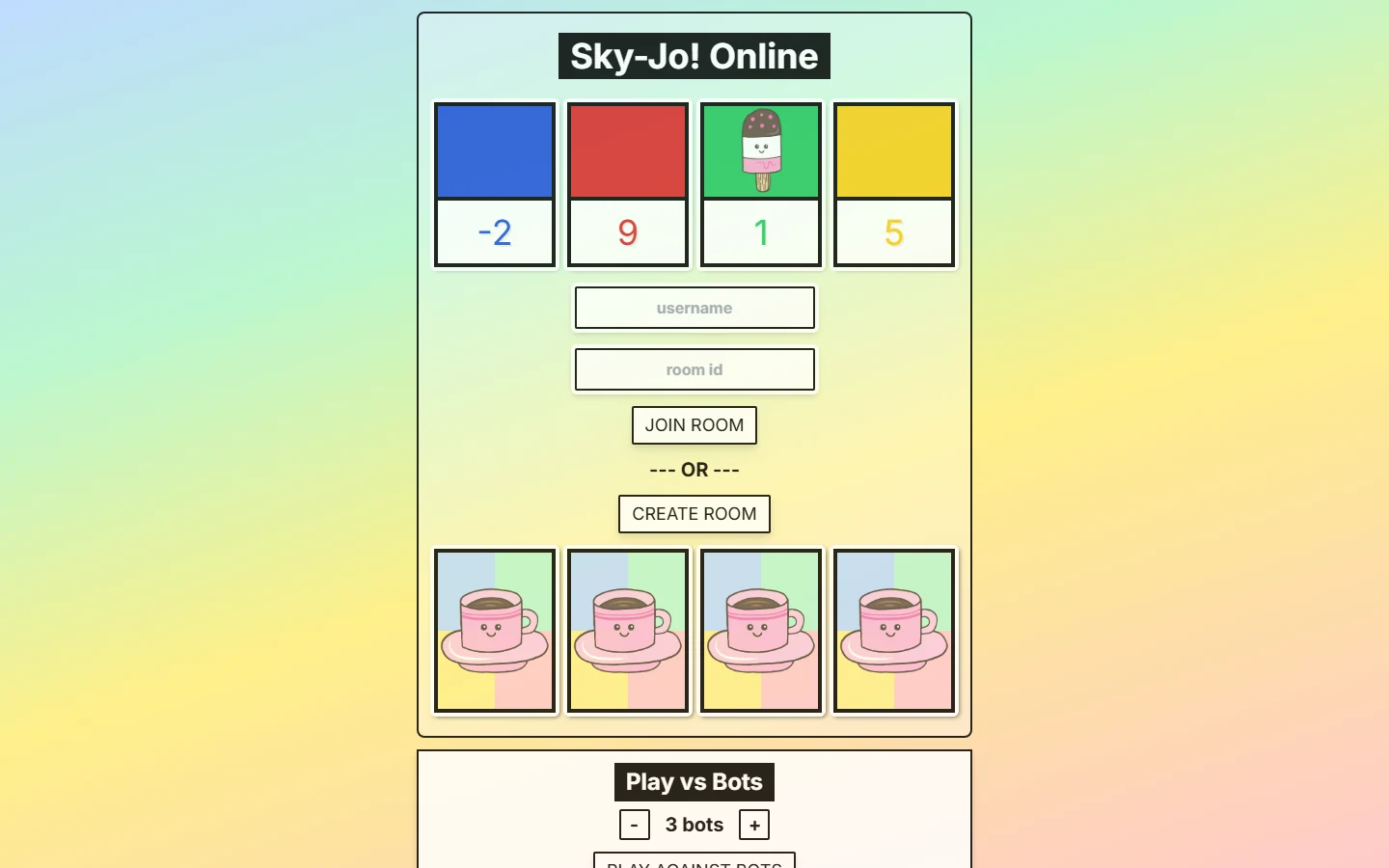
Short answer: Skyjo.de is convenient for quick bot practice and private friend rooms, with an eight-seat lobby shown on the current site. Treat it as an independent implementation, and use the complete Classic rules for scoring details its short rules page does not explain.
What Is Skyjo.de—and Is It an Official SKYJO Site?
Skyjo.de is a browser game currently branded “Sky-Jo! Online.” Its landing screen lets you enter a username and room ID, create a new room, or start against a chosen number of bots. In keyword searches, “Skyjo de” therefore usually means “take me to the skyjo.de website,” not “explain SKYJO in German.”
Do not mistake the country-code domain for proof of publisher ownership. Magilano identifies itself as the publisher and vendor of the boxed SKYJO product on its own website. The Skyjo.de interface and rules pages surfaced in this review do not identify the browser game as a Magilano service or present verifiable publisher endorsement. The responsible description is therefore an independent browser implementation, unless the platform later publishes evidence to the contrary.
Why the distinction matters
A web game can reproduce familiar mechanics without becoming the official rules authority. Use Magilano for product support and boxed-edition questions; use Skyjo.de's own pages to understand what its software currently enforces.
That does not make the site unusable. It changes the review standard. We judge Skyjo.de on friction, room setup, bot access, rules fidelity and reliability—not on assumptions created by its domain name. Players who need the published baseline should keep the complete Classic SKYJO rules beside the browser game, especially when scoring or round-end behavior is unclear.
How to Create or Join a Skyjo.de Room
The home screen separates identity from destination. Your username tells the table who you are; the room ID tells the site which lobby you want. A host does not need an existing code because Create Room makes the destination. Guests should not press Create Room, or they will split the group across separate lobbies.
- 1Host: enter a recognizable username.
Use the name your friends expect. Then select Create Room and wait for the lobby rather than opening multiple tabs.
- 2Copy one invitation.
The lobby shows a room ID and a Copy URL control. Send either the complete copied URL or clearly labeled room ID in a private group message.
- 3Guests: enter name and room ID.
A guest using the home screen fills both fields and chooses Join Room. A copied room URL may carry the destination, but each player should still use a distinct display name.
- 4Confirm the lobby count.
Skyjo.de displays joined players against an eight-seat capacity. Read the list aloud and launch only after every expected name appears once.
If somebody lands on an empty lobby, compare the visible room ID character by character and delete old invitations from the chat. The clean recovery is one host, one freshly copied invitation and one browser tab per player. Do not troubleshoot by having every guest create a new room; that multiplies valid-looking but incompatible codes.
The observed interface does not promise room passwords, permanent rooms or account-based invitations, so plan around what is visible: a room identifier, a copied URL and a live participant list. For alternative platform flows, use the online with friends guide.
Playing Skyjo.de With Friends: A Reliable Session Checklist
Getting everyone into the lobby is only half the setup. A sequential card game loses energy when players do not know whose turn it is, which rule set applies, or where to recover the current invitation. Spend one minute on coordination before the first draw.
- Name check
Match every lobby name to a real person. Ask duplicate or anonymous names to rejoin distinctly before cards appear.
- Rules sentence
Say: “lowest score, vertical triples clear, and we are treating the complete Classic round-end rules as our reference.”
- Communication channel
Use a voice call or existing group chat. Skyjo.de exposes feedback/find-player and Discord links, but a private friend group can keep its normal channel.
- Recovery point
Pin the current room URL and designate the original host. If a page fails, report what the screen shows before anyone creates a replacement room.
For two players, Skyjo.de is easy to coordinate: turns alternate, one opponent's visible cards are trackable, and the discard cannot change six times before returning. That makes head-to-head a sensible first connection test. It also sharpens the ending decision because one rival gets the final chance to tie or beat you under complete Classic scoring. The two-player online guide covers that pacing in more detail.
With six to eight players, the lobby has room but the experience becomes social rather than rapid. Encourage each player to watch the previous turn and decide provisionally before control arrives. A visible discard that looked perfect may be gone long before your turn, so do not spend the whole wait planning around one card.
Finally, distinguish a game fault from a communication fault. A missing name or wrong room usually needs a fresh invitation check; silence during turns usually needs the voice channel; disagreement about scoring needs the full rules reference. Skyjo.de's surfaced pages do not promise a particular reconnect window, so avoid telling a disconnected friend their seat is guaranteed. Preserve the invitation, wait briefly, and report the actual screen state.
How Bot Games Work—and What They Are Good For
Skyjo.de places bot play directly on the home screen. At review time, the selector displays “3 bots,” with minus and plus controls beside it and a Play Against Bots button. That is a useful low-friction route: choose the displayed opponent count, start, and learn the interface without waiting for a room code or another human.
Treat bots as a practice fixture, not an authenticated skill rating. The surfaced page does not label difficulty levels or explain the decision model. A bot may make moves quickly and consistently, yet that does not prove it reads the discard, protects a lead or takes social risks the way an experienced human does.
Game 1: interface drill
Say each choice aloud: known discard and mandatory swap, or hidden draw and keep/reject decision. The goal is zero accidental clicks, not first place.
Game 2: information drill
Before drawing, inspect the visible discard and every exposed high card. Record one turn where certainty beats the excitement of a blind draw.
Game 3: finish drill
Do not expose the final hidden card until your visible score has a meaningful buffer. Note what the bots change on their last opportunities.
Bot count also changes what you can observe. Against one rival, the discard cycle is predictable and you can track every visible improvement. With several bots, more cards move before control returns, so a planned pickup often disappears. Practicing both conditions teaches adaptability, but compare decisions rather than wins because the shuffle and hidden information remain powerful.
The best handoff to human play is procedural: you know where to draw, how the interface signals a swap, what triggers a column clear and when a round looks close. For deeper reasoning behind those decisions, use the SKYJO strategy guide. Do not advertise a bot win streak as evidence that the site's AI matches advanced players.
Skyjo.de Rules Compared With Classic SKYJO
Skyjo.de's rules page captures the recognizable core: 12 cards per player, two initially revealed cards, turn-by-turn play, a choice between the discard and a new draw, and removal of three equal cards in a vertical column. It also correctly notes that a negative triple is removed, even though clearing -1s or -2s can increase your score by taking useful negative points away.
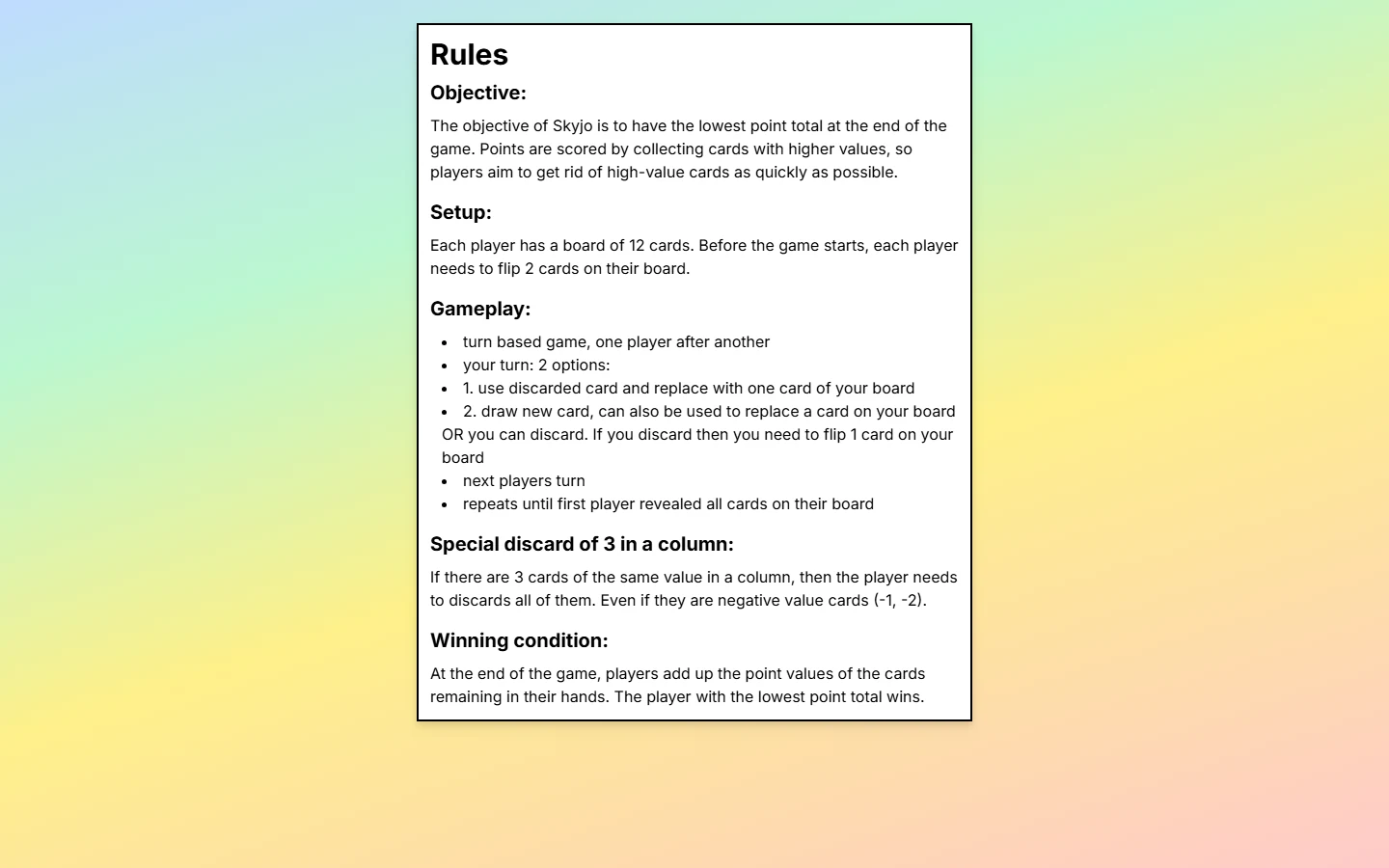
| Rule area | Skyjo.de rules page | Complete Classic baseline |
|---|---|---|
| Setup and turn | 12-card board, two reveals, discard/new-card choices. | Also defines the 150-card deck and starting-player procedure. |
| Column | Three equal vertical cards are discarded, including negatives. | Same mandatory vertical removal; rows do not qualify in Classic. |
| Round end | Says play repeats until the first player reveals all cards. | Every following player receives one final turn before all grids score. |
| Finisher risk | Not explained on the concise page. | A positive finisher score doubles unless it is strictly the lowest; a tie is unsafe. |
| Whole match | States the remaining-card total decides the winner. | Rounds accumulate until someone reaches 100+, then the lowest cumulative total wins. |
The practical gap is ending risk. Imagine you reveal your last card and total 11. After the opponent's final turn, they also total 11. Under Classic, you were not strictly lower, so your positive 11 records as 22 while theirs remains 11. If you ended on -2 and another player reached -4, your -2 would stay -2 because the Classic doubling penalty applies only to positive finisher totals.
A documentation omission does not prove the software ignores a rule. It means the short page is not enough to predict every edge case. Observe what the interface records, and if your group cares about faithful practice, agree that the published Classic rule controls any dispute before playing.
Nothing on this page should be used to infer SKYJO Action behavior. Action has its own physical card types and edition-specific row/column interactions. For a complete Classic teaching sequence, scoring examples and downloadable reference, use the full SKYJO rules hub.
Device, Privacy, Accessibility, and Service Limitations
Skyjo.de is a web application rather than a boxed product or a store-installed app. The current page includes a responsive viewport and loads a JavaScript client, so it is designed to adapt to screen width but still depends on a working modern browser and network session. Visit the site directly; do not download an unrelated app merely because its name resembles the domain.
The interface asks for a username and room ID. Use a casual display name rather than an email address, real full name or other sensitive identifier, and share the room invitation only with the intended group. The reviewed home surface links to asset credits, general credits, feedback/find-player help and Discord, but our current search did not surface a dedicated privacy notice or accessibility conformance statement for the domain. That is a limit on what can be promised, not proof of improper behavior.
Run this preflight before game night
- ✓Start one bot game on the smallest phone and oldest browser your group will use.
- ✓Confirm card values, turn prompts and selectable targets remain readable at comfortable zoom.
- ✓Test keyboard or assistive-technology navigation if any player depends on it; no certification was found.
- ✓Choose non-sensitive names, privately send the room link and agree on a fallback before inviting a class or large family.
Numbers appear on the cards, which is better than conveying value by color alone, but accessibility is more than contrast. Target size, focus order, screen-reader labels and motion behavior can determine whether a person can complete a turn independently. A ten-second visual check by the host cannot replace a real-device test by the player who uses those features.
Finally, independent browser services can change without app-store release notes or physical rulebook permanence. Do not assume rooms persist, games work offline, or a disconnected seat will always recover unless the live site documents and demonstrates it. Keep the online play hub available as a fallback instead of letting one service outage cancel the evening.
Is Skyjo.de Worth Using? Who It Fits and Better Alternatives
Skyjo.de is worth a test when you want a browser table with two clear routes: start immediately against bots or create a room for friends. The landing screen exposes the necessary controls without burying them in an app store, and the lobby advertises capacity for eight. That is a persuasive combination for a casual remote evening.
Good choice
You want quick bot practice, a shareable friend room, familiar Classic-like turns and no native installation.
Test first
Your group uses small phones, assistive technology, unstable networks or needs complete edge-case scoring explained on-site.
Look elsewhere
You require verified Magilano affiliation, offline/native-app guarantees, documented ranked AI, permanent accounts or SKYJO Action.
Its strengths are access and mode clarity, not documented feature breadth. You can see how to create, join and change the bot count. By contrast, the concise rules page does not fully teach the multi-round 100-point structure or the strict-low finisher penalty, and the surfaced pages do not establish the service as official. These gaps are manageable for experienced players with a full rules reference; they matter more for a beginner who assumes software and one short page explain everything.
Alternatives solve different problems. Another browser implementation may offer different human/AI seat controls. A mobile app may offer offline practice, profiles or store-level privacy disclosures but add installation and account friction. The boxed game supplies the physical social experience and published rules but does not connect distant players. Compare the actual job—practice, private remote play, public competition or official learning—before comparing logos.
Quick verdict: start with one bot game on the device you intend to use. If the cards and controls are comfortable, create a private room for two or three friends, keep the full Classic rules available, and expand the group only after that clean test.
To compare other current routes without assuming one platform fits everyone, open the SKYJO online multiplayer guide.
The sensible first visit
Open a bot game, confirm the interface works on your real device, then create one private room and invite two or three friends with the copied URL. Keep non-sensitive display names and the complete rules nearby. If any requirement fails, compare another option through the SKYJO online play hub instead of forcing the session.

Loading comments...