SKYJO Online Multiplayer: Full Guide to Playing With Friends (2026)
The complete guide to playing SKYJO online with friends in 2026. Discover the best platforms, learn setup strategies, master winning tactics, and dominate every multiplayer session from anywhere in the world.
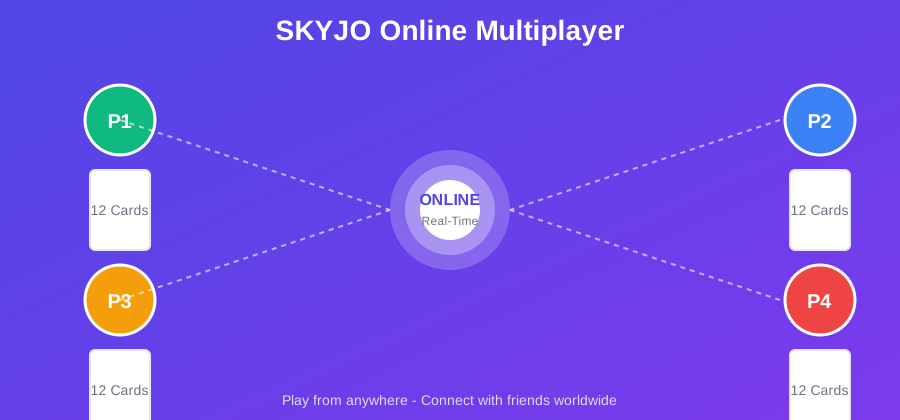
Quick Facts: SKYJO Online Multiplayer
| Feature | Details |
|---|---|
| Game Type | Strategic card game with lowest score wins |
| Players Online | 2-8 players per session |
| Best Free Platform | Skyjo.net (browser-based, no download) |
| Best Mobile App | Skyjo-o (iOS & Android, up to 8 players) |
| Game Duration | 15-45 minutes per full game |
| Card Values | -2 to 12 (150 cards total) |
| Winning Score | Lowest total when any player reaches 100+ |
| Skill Level | Beginner to Advanced |
| Age Range | 8+ years old |
What Is SKYJO Online Multiplayer?
SKYJO is a fast-paced strategic card game where players compete to achieve the lowest score by managing a 12-card grid. Playing SKYJO online with friends brings the same excitement of the physical game to your screen, complete with strategic card swapping, column matching, and the thrill of timing when to end each round.
The game uses a deck of 150 cards numbered from -2 to 12. Each player arranges 12 cards in a 4x3 grid, initially face-down except for two revealed cards. On your turn, you draw from either the deck or discard pile, then swap cards to minimize your score. The key mechanic is column matching: when three identical cards appear in a vertical column, they're removed entirely, eliminating those points from your score.
Online multiplayer makes SKYJO accessible from anywhere. Whether you're across the room or across the world from your opponents, digital platforms let you enjoy real-time games with friends, family, or players worldwide. In this comprehensive guide, we'll cover every platform where you can play SKYJO online, walk you through setup on each one, share winning multiplayer strategies, and help you choose the best option for your group.
Why Play SKYJO Online?
Play Anywhere, Anytime
No physical cards needed. Connect with friends across the globe instantly.
Automatic Scoring
Digital platforms handle all calculations, column removal, and score tracking.
Practice Against AI
Sharpen your skills with computer opponents before challenging real players.
Free Options Available
Multiple platforms offer free online play with no purchase required.
Best Platforms to Play SKYJO Online (2026)
Finding the right platform to play SKYJO online depends on your preferences: browser-based convenience, mobile accessibility, or advanced features. Here's a comprehensive breakdown of every available option in 2026.
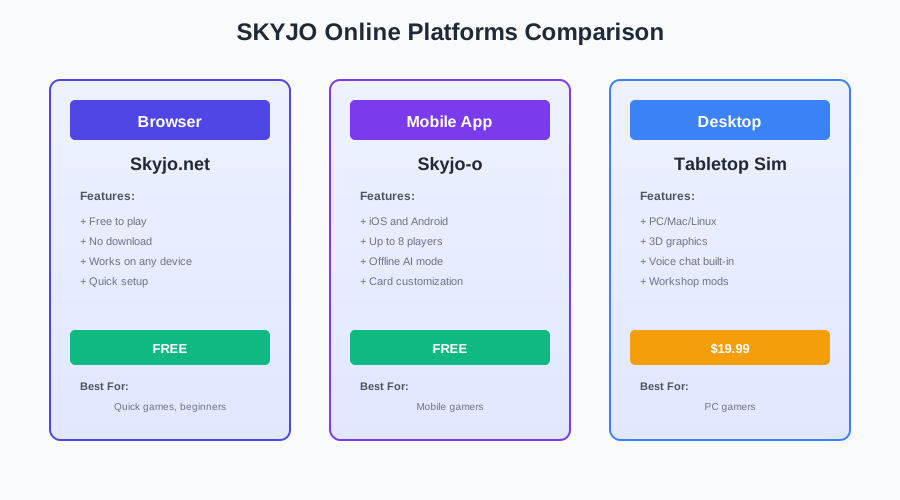
Skyjo.net (Browser-Based)
The most accessible option for playing SKYJO online. Simply visit skyjo.net in any web browser and start playing immediately with friends or against AI opponents.
Pros:
- - No installation required
- - Works on any device with a browser
- - Free to play
- - Quick game setup
- - Play against computer or friends
Cons:
- - Requires stable internet connection
- - Limited customization options
- - Basic graphics
Best For: Quick games, beginners, players who don't want to download apps, cross-platform play.
Skyjo-o: Flip Your Skyjoe (Mobile App)
The most feature-rich mobile app for SKYJO, with 140,000+ downloads and a 4.88/5 rating. Supports both online multiplayer and offline AI play with customizable difficulty levels.
Pros:
- - Supports up to 8 players online
- - Play against the world feature
- - Offline AI mode with difficulty levels
- - Card customization options
- - Regular updates and bug fixes
- - No login required to play
Cons:
- - Requires app download (199 MB)
- - Mobile-only (no desktop version)
- - Some features require login
Best For: Mobile gamers, players who want offline practice, groups of 5-8 players, competitive online matches.
Board Game Arena
Board Game Arena is the world's largest online board gaming platform with 11+ million players and 1,280+ games. However, SKYJO is not currently available on BGA as of 2026.
Status: SKYJO is not licensed on Board Game Arena. Players looking for similar games on BGA can try "101: The Match!" which has poker/skyjo-style gameplay.
Tabletop Simulator (Steam)
Tabletop Simulator offers multiple SKYJO mods through Steam Workshop, including scripted versions with automatic scoring. Requires purchasing Tabletop Simulator on Steam.
Pros:
- - Multiple SKYJO versions available
- - Scripted automation for scoring
- - Voice chat built-in
- - Realistic 3D card physics
- - Multilingual support
Cons:
- - Requires purchasing Tabletop Simulator
- - Some mods removed for copyright
- - Steeper learning curve
- - Requires decent PC specs
Best For: PC gamers, players who own Tabletop Simulator, groups wanting voice chat integration, realistic simulation experience.
Platform Comparison Table
| Platform | Cost | Max Players | Device | Offline Mode |
|---|---|---|---|---|
| Skyjo.net | Free | 2-8 | Browser (All) | No |
| Skyjo-o App | Free | 2-8 | iOS & Android | Yes (AI) |
| Tabletop Simulator | $19.99 | 2-8 | PC/Mac | Yes |
How to Set Up SKYJO Online Multiplayer
Setting up an online SKYJO game with friends is straightforward on most platforms. Here's a step-by-step guide for each major platform.
Creating a Private Game Room
On Skyjo.net (Browser):
- 1 Visit skyjo.net in your web browser
- 2 Click "Play Online" or "Multiplayer" button
- 3 Select "Create Private Room" option
- 4 Copy the room code or share link generated
- 5 Send the code to friends via text, email, or messaging app
- 6 Wait for players to join, then click "Start Game"
On Skyjo-o App (Mobile):
- 1 Download "Skyjo-o: Flip Your Skyjoe" from App Store or Google Play
- 2 Open the app (no login required for basic play)
- 3 Tap "Multiplayer" from the main menu
- 4 Choose "Create Session" to host a game
- 5 Set player count (2-8) and game settings
- 6 Share the session code with friends who have the app installed
- 7 Start the game once all players have joined
On Tabletop Simulator (Steam):
- 1 Launch Tabletop Simulator on Steam
- 2 Go to "Workshop" tab and search "SKYJO"
- 3 Subscribe to "Skyjo Deluxe" or "Skyjo (Minimalist)" mod
- 4 Click "Create" and select "Multiplayer"
- 5 Load the SKYJO mod from your subscribed items
- 6 Invite Steam friends or share the server code
Inviting Friends to Join
Best Methods:
- + Direct Link Sharing: Copy and paste the game URL or room code via messaging apps
- + QR Code: Some platforms generate QR codes for easy mobile joining
- + Room Code: Share a 4-6 digit code that friends enter in the app
- + Steam Friends: Invite directly through Steam overlay (Tabletop Simulator)
Pro Tips:
- - Test the link yourself before sharing to ensure it works
- - Set up voice chat (Discord, Zoom) before starting for better coordination
- - Give friends 5-10 minutes to join before starting
- - Ensure all players have the same app version to avoid compatibility issues
Game Settings and Options
Most online SKYJO platforms offer customizable settings to tailor the experience:
Player Count
Choose 2-8 players. For faster games, stick to 2-4 players. For party atmosphere, go with 5-8 players.
Turn Timer
Set time limits per turn (30-120 seconds) to keep the game moving. Disable for casual play.
Winning Score
Standard is 100 points. Lower to 50 for quick games, raise to 150 for extended sessions.
AI Difficulty
If playing with AI opponents, choose Easy, Normal, Hard, or Challenger difficulty levels.
SKYJO Online Rules and Gameplay
Whether you're new to SKYJO or need a refresher, here's a complete breakdown of the rules as they apply to online multiplayer games.
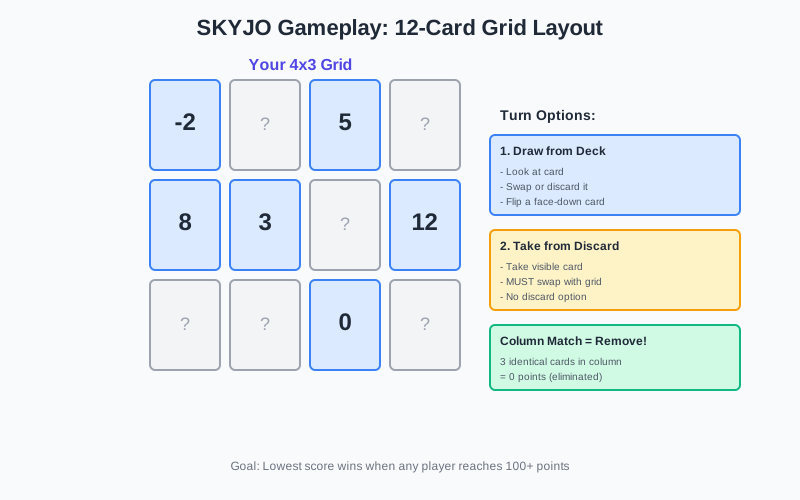
Basic Setup (12-Card Grid)
Each player receives 12 cards arranged in a 4x3 grid (4 columns, 3 rows). All cards start face-down except for two cards that each player chooses to reveal at the beginning.
Initial Setup:
- - Each player gets 12 cards in a 4x3 grid, all face-down
- - Each player flips 2 cards of their choice face-up
- - Remaining deck becomes the draw pile
- - One card is flipped face-up to start the discard pile
- - Player with the highest total from their 2 revealed cards goes first
Card Values: The deck contains 150 cards with values ranging from -2 to 12. Lower values are better since the goal is to minimize your score.
Turn Structure
On your turn, you have two main options:
Option 1: Draw from Deck
- 1. Draw the top card from the draw pile
- 2. Look at the card
- 3. Either:
- - Swap it with any card in your grid (face-up or face-down)
- - Discard it and flip one of your face-down cards
Option 2: Take from Discard
- 1. Take the top card from the discard pile
- 2. You MUST swap it with one of your grid cards
- 3. The swapped card goes to the discard pile
- 4. You cannot discard the card you just took
Important: Taking from the discard pile is binding - you must use that card. Drawing from the deck gives you more flexibility.
Column Matching Strategy
The most powerful mechanic in SKYJO is column elimination. When all three cards in a vertical column show the same number and are face-up, that entire column is immediately removed from the game.
Column Matching Rules:
- - All 3 cards in a column must be identical (same number)
- - All 3 cards must be face-up
- - The column is removed immediately and automatically
- - Those cards score 0 points for you
- - Works with any value, including high cards like 12
Strategic Tip: You can intentionally collect high-value cards (like 12s) in one column, planning to eliminate them all at once. This is risky but can pay off massively.
Ending a Round
A round ends when one player has all their cards face-up. Once this happens, all other players get one final turn, then everyone reveals their remaining face-down cards.
The Doubling Penalty:
The player who ended the round must have the lowest score. If they don't, their score for that round is doubled as a penalty.
Example: You end the round with 25 points, but another player has 23 points. Your score becomes 50 points for that round.
When to End: Only flip your last card when you're confident you have the lowest score. Otherwise, let someone else take the risk.
Scoring System
SKYJO uses cumulative scoring across multiple rounds. The game ends when any player reaches 100+ points, and the player with the lowest total score wins.
| Card Value | Points | Strategy |
|---|---|---|
| -2 | -2 points | Best card - keep at all costs |
| -1 | -1 point | Excellent - protect these |
| 0 to 4 | Face value | Good cards - keep if possible |
| 5 to 8 | Face value | Average - replace when better options appear |
| 9 to 12 | Face value | Bad cards - replace immediately or build column |
Scoring Example: After a round, you have cards showing: -2, 0, 3, 5, 7, 8, 10, 12 (one column was eliminated). Your score is: -2 + 0 + 3 + 5 + 7 + 8 + 10 + 12 = 43 points.
Winning Strategies for Online Multiplayer
Mastering SKYJO online requires more than luck. These proven strategies will help you dominate multiplayer sessions and consistently achieve lower scores than your opponents.
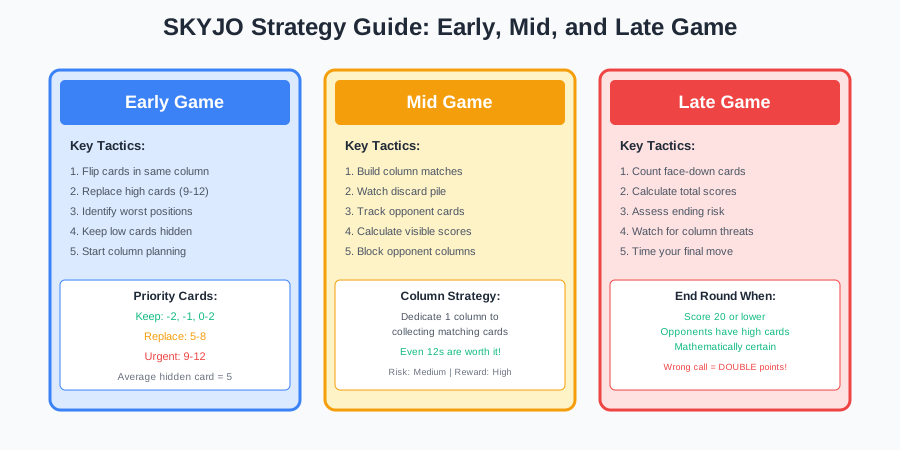
Early Game Tactics
Initial Card Selection:
- 1. Flip cards in the same column - This gives you a head start on column matching
- 2. Avoid corner cards initially - Middle cards give you more flexibility for column building
- 3. Remember your face-down cards - Mental tracking helps later decisions
First Few Turns:
- + Replace high-value cards (9-12) immediately
- + Flip face-down cards to identify your worst positions
- + Start planning column matches early
- + Keep low cards (-2, -1, 0-2) hidden from opponents
Mid-Game Card Management
The mid-game is where strategic depth emerges. Focus on these key tactics:
Column Building
Dedicate one column to collecting matching cards. Even high values (12s) are worth it if you can complete the set.
Risk: Medium | Reward: High
Discard Pile Watching
Take cards from the discard pile when they complete columns or replace cards valued 5+.
Risk: Low | Reward: Medium
Opponent Tracking
Count how many face-down cards opponents have. Players with many unknowns are risky to race against.
Risk: None | Reward: High
SKYJO vs SKYJO Action Online
Understanding the differences between classic SKYJO and SKYJO Action helps you choose the right version for online play.
| Feature | SKYJO Classic | SKYJO Action |
|---|---|---|
| Core Gameplay | 12-card grid, lowest score wins | Same core gameplay |
| Action Cards | None | 9 types (30 cards total) |
| Star Cards | None | Wild cards that trigger action draws |
| Complexity | Simple, family-friendly | More strategic, chaotic |
| Online Availability | Widely available | Limited (Tabletop Simulator) |
Which Version to Play Online?
Choose SKYJO Classic If:
- - You want quick, casual games
- - Playing with beginners or family
- - You prefer pure strategy without chaos
- - You want free browser-based options
Choose SKYJO Action If:
- - You want more player interaction
- - You enjoy unpredictable twists
- - You have Tabletop Simulator
- - You like deeper strategic options
Common Issues and Troubleshooting
Encountering technical issues while playing SKYJO online? Here are solutions to the most common problems.
Connection Problems
Symptoms: Game disconnects, lag, unable to join rooms
Solutions:
- - Check your internet connection speed (minimum 5 Mbps recommended)
- - Switch from Wi-Fi to mobile data or vice versa
- - Restart your router
- - Close other bandwidth-heavy applications
- - Disable VPN if active
Game Not Loading
Symptoms: Blank screen, infinite loading, crashes on startup
Solutions:
- - Clear browser cache and cookies (for web-based platforms)
- - Update the app to the latest version
- - Restart your device
- - Try a different browser (Chrome, Firefox, Safari)
- - Reinstall the app as a last resort
Finding Active Players
Symptoms: Empty lobbies, long wait times for matchmaking
Solutions:
- - Play during peak hours (evenings and weekends)
- - Use the Skyjo-o app "Play Against the World" feature
- - Join SKYJO Discord communities or Facebook groups
- - Organize games with friends instead of random matchmaking
- - Try different platforms if one is inactive
FAQ: SKYJO Online Multiplayer
Can I play SKYJO online for free?
Yes! Skyjo.net offers free browser-based play with no download required. The Skyjo-o mobile app is also free on iOS and Android. Tabletop Simulator requires purchasing the base software ($19.99) but offers the most feature-rich experience.
How many players can play SKYJO online?
SKYJO online supports 2-8 players on most platforms. Skyjo.net and Skyjo-o both support up to 8 players. For the best experience, 2-4 players is ideal for faster games, while 5-8 players creates a more chaotic party atmosphere.
Is SKYJO available on Board Game Arena?
No, SKYJO is not currently available on Board Game Arena as of 2026. The game is not licensed on the platform. For online play, use Skyjo.net, the Skyjo-o mobile app, or Tabletop Simulator instead.
Can I play SKYJO Action online?
SKYJO Action is available online through Tabletop Simulator via Steam Workshop mods. However, most free platforms (Skyjo.net, Skyjo-o) only support classic SKYJO rules without action cards. If you want the full Action experience online, Tabletop Simulator is your best option.
Do I need to create an account to play SKYJO online?
It depends on the platform. Skyjo.net typically allows guest play without registration. The Skyjo-o app lets you play without login for basic features, but some features require an account. Tabletop Simulator requires a Steam account.
How long does an online SKYJO game take?
A standard SKYJO game online takes 15-45 minutes depending on player count and pace. With 2-4 players, expect 15-25 minutes. With 5-8 players, games typically last 30-45 minutes. You can shorten games by lowering the winning score threshold from 100 to 50 points.
Can I play SKYJO online on mobile?
Yes! The Skyjo-o app is available on both iOS (App Store) and Android (Google Play). Skyjo.net also works in mobile browsers, though the experience is optimized for desktop. The Skyjo-o app is the best mobile option with full multiplayer support.
What is the best platform for playing SKYJO online with friends?
For quick, free games: Skyjo.net (browser-based, no download). For mobile play: Skyjo-o app (iOS/Android, up to 8 players). For the best graphics and features: Tabletop Simulator (requires purchase). Choose based on your device, budget, and whether you want casual or immersive gameplay.
Can I practice SKYJO against AI before playing online?
Yes! The Skyjo-o app offers offline AI mode with multiple difficulty levels (Easy, Normal, Hard, Challenger). This is perfect for learning strategies before competing against real players. Skyjo.net also offers computer opponents for practice.
Is there voice chat built into SKYJO online platforms?
Most SKYJO online platforms do not have built-in voice chat. Tabletop Simulator has integrated voice chat. For other platforms, use external apps like Discord, Zoom, or Google Meet alongside your game for the best social experience.
Ready to Play SKYJO Online?
Start playing SKYJO online with friends today. Choose your platform and dive into strategic card game fun from anywhere in the world.

Loading comments...