Play SKYJO Online Free: Best Sites & Apps (2026)
Discover the top platforms to play SKYJO online with friends - no download required!
Quick Overview: SKYJO Online Options
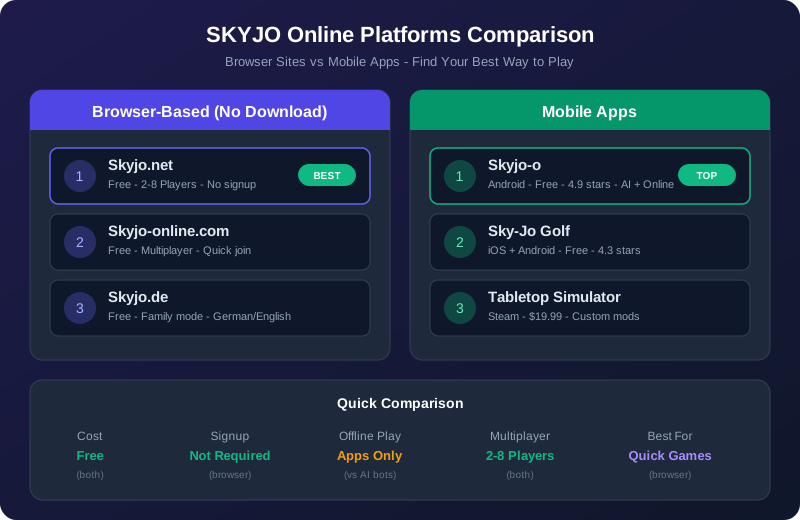
Want to play SKYJO online right now? You have two main options: browser-based sites that require no download, or mobile apps with offline modes. Here's a quick comparison to help you choose.
| Platform Type | Best For | Cost | Setup Time |
|---|---|---|---|
| Browser Sites | Quick games, no commitment | 100% Free | Instant |
| Mobile Apps | Offline play, better graphics | Free + Ads | 2-3 minutes |
Our Recommendation:
Start with Skyjo.net for instant browser play. If you love the game and want offline mode, download the mobile app later.
Best Browser-Based Sites (No Download)
These platforms let you play SKYJO instantly in your web browser - no app installation, no account creation, just pure gaming fun.
Skyjo.net - Most Popular Free Option
Top PickSkyjo.net is the most popular browser-based platform for playing SKYJO online. It offers a clean, intuitive interface and supports both multiplayer games with friends and solo play against AI opponents.
Key Features:
- + 100% free with no ads
- + No account or registration required
- + Play with 2-8 players online
- + Simple room creation and invite links
- + Works on desktop and mobile browsers
Best For:
- - Quick games with friends
- - First-time SKYJO players
- - Remote family game nights
How to Start: Visit Skyjo.net, click "Create Room", share the link with friends, and start playing instantly.
Skyjo-online.com - Multiplayer Focused
Skyjo-online.com is designed specifically for multiplayer SKYJO games. The platform emphasizes social play and makes it easy to invite friends to join your game room.
Key Features:
- + Optimized for group play
- + Easy room sharing system
- + Real-time multiplayer
- + Free to play
Limitations:
- - Requires stable internet connection
- - No offline mode
Skyjo.de - Family & Friends Play
Skyjo.de is a German-based platform that offers SKYJO online play with a focus on family-friendly gaming. The interface is simple and welcoming for players of all ages.
Key Features:
- + Family-friendly interface
- + Multi-language support
- + Private game rooms
Best For:
- - European players
- - Multi-generational gaming
Skyjo.online - Simple Interface
Skyjo.online offers a minimalist approach to online SKYJO play. The platform strips away unnecessary features to focus on pure gameplay.
- + Ultra-simple interface
- + Fast loading times
- + Works on older devices
SKYJO.info - Play Right Here
You're already on SKYJO.info - the ultimate resource for everything SKYJO! We offer free online play, complete rules guides, strategy tips, and buying guides all in one place.
Why Play Here:
- + Integrated with rules and strategy guides
- + No ads or distractions
- + Works on all devices
- + Regularly updated
Bonus: Access our complete SKYJO library including:
- - Complete rules PDF
- - Strategy guides
- - SKYJO vs SKYJO Action comparison
- - Best prices on Amazon
Best Mobile Apps for SKYJO
Mobile apps offer the advantage of offline play, better graphics, and progress tracking. Here are the top SKYJO apps for iOS and Android.
Sky-Jo (iOS) - App Store Option
iOSThe official Sky-Jo app for iPhone and iPad brings the card game to your Apple devices with polished graphics and smooth gameplay.
Features:
- + Play offline vs AI
- + Online multiplayer mode
- + Optimized for iPad
- + Clean, intuitive interface
Drawbacks:
- - Ads after every game
- - Some users report connection issues
- - AI difficulty not adjustable
Download: Available free on the Apple App Store. Search "Sky-Jo Golf Card Game"
Sky-Jo: Fun Family Card Game (Android)
AndroidThis Android version brings SKYJO to Google Play with online multiplayer and family-friendly features. It's completely free with ad support.
Features:
- + Free online multiplayer
- + Play with friends and family
- + Suitable for all ages
- + Regular updates
Best For:
- - Android users
- - Family game nights
- - Travel and commuting
Download: Available free on Google Play Store. Search "Sky-Jo Fun Family Card Game"
Skyjo-o (Android) - Offline & Online Modes
AndroidSkyjo-o stands out with its robust offline mode and "Play against the world" feature that lets you compete with players globally.
Features:
- + Strong offline mode vs AI
- + Online multiplayer with friends
- + "Play against the world" mode
- + Supports up to 8 players
- + Works for ages 8+
Why Choose This:
- - Best offline experience
- - Global player matching
- - No internet required for solo play
Download: Available on Google Play Store and Uptodown. Search "Skyjo-o"
How to Play SKYJO Online with Friends
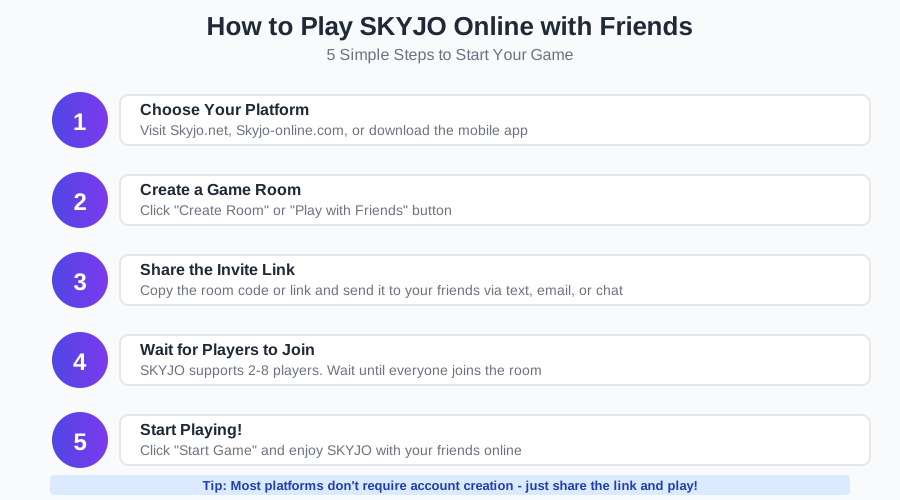
Setting up an online SKYJO game with friends is incredibly easy. Follow these simple steps to get started in under 2 minutes.
Step 1: Creating a Game Room
Most SKYJO online platforms make room creation simple:
- Visit your chosen platform (Skyjo.net, Skyjo-online.com, etc.)
- Look for a "Create Room", "New Game", or "Play with Friends" button
- Click it to generate a unique game room
- The platform will create a room code or shareable link
Step 2: Sharing Invite Links
Once your room is created, invite your friends:
- - Copy the link: Most platforms provide a direct URL you can copy
- - Share via messaging: Send the link through WhatsApp, Discord, text, or email
- - Room codes: Some platforms use short codes (like "ABCD1234") that friends can enter manually
Step 3: Multiplayer Tips & Etiquette
Make your online SKYJO games more enjoyable with these tips:
Do's:
- + Wait for all players before starting
- + Take turns at a reasonable pace
- + Use voice chat for better social experience
- + Be patient with new players
Don'ts:
- - Don't rush other players
- - Don't quit mid-game
- - Don't share your cards in chat
- - Don't play on unstable connections
SKYJO Online vs Physical Card Game
Both versions have their strengths. Here's a detailed comparison to help you decide which is right for your situation.
Online SKYJO
Advantages:
- + Play with friends anywhere in the world
- + No setup or cleanup required
- + Automatic scoring and rule enforcement
- + Free to play (no purchase needed)
- + Play solo vs AI anytime
Disadvantages:
- - Less social interaction
- - Requires internet connection (browser)
- - Screen fatigue
- - No tactile card experience
Physical Card Game
Advantages:
- + Face-to-face social experience
- + Tactile card handling
- + No screens or devices needed
- + Perfect for family gatherings
- + Collectible physical game
Disadvantages:
- - Requires physical purchase ($15-20)
- - Everyone must be in same location
- - Manual scoring and rule tracking
- - Setup and cleanup time
When to Choose Each:
- Choose Online: Remote friends, quick games, learning the rules, or trying before buying
- Choose Physical: Family game nights, parties, camping trips, or when you want the full social experience
Is Board Game Arena Available for SKYJO?
Board Game Arena (BGA) is one of the most popular platforms for playing board games online, with over 1,280 games available. However, SKYJO is currently not available on Board Game Arena.
Why SKYJO Isn't on BGA
Board Game Arena requires official licensing agreements with game publishers. While BGA has an extensive library, SKYJO from Magilano has not yet been added to the platform.
Similar Games on BGA: If you enjoy SKYJO's gameplay, you might like "101: The Match!" on Board Game Arena, which features similar number tile placement and combination mechanics.
Best Alternatives to BGA for SKYJO
Since SKYJO isn't on Board Game Arena, here are the best alternatives:
Skyjo.net
Dedicated SKYJO platform with similar ease of use to BGA
Mobile Apps
iOS and Android apps with offline modes
SKYJO.info
Play right here with integrated rules and guides
Tips for Playing SKYJO Online
Playing SKYJO online requires some strategy adjustments compared to the physical game. Here are expert tips to improve your digital gameplay.
Strategy Adjustments for Digital Play
-
1
Track the Discard Pile Carefully
Online interfaces make it easy to see the discard pile history. Use this to your advantage to remember what cards have been played.
-
2
Watch Opponent Cards
Digital versions display all revealed cards clearly. Pay attention to what your opponents have showing to avoid giving them useful cards.
-
3
Use the Undo Feature Wisely
Some platforms allow you to undo moves before confirming. Take advantage of this to test different card placements.
-
4
Plan Column Elimination Early
The visual grid makes it easier to plan column matches. Identify which column to target for elimination from the start.
-
5
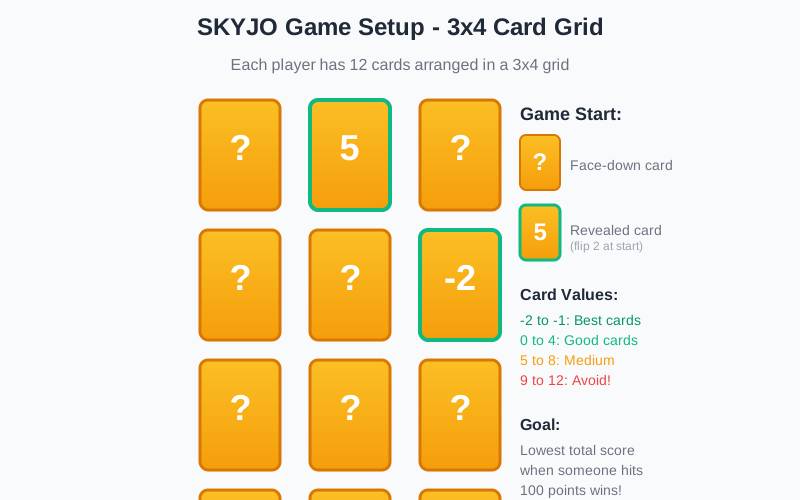
Keep Low Cards (0-4)
Always prioritize keeping cards with values 4 or lower. These are your foundation for a winning score.
Common Mistakes to Avoid
-
X
Playing Too Fast
Online play can feel rushed. Take your time to think through each move, especially when deciding whether to end the round.
-
X
Ignoring Opponent Scores
The interface shows everyone's visible scores. Don't end the round if you're not actually winning!
-
X
Forgetting the Doubling Rule
If you end the round but don't have the lowest score, your points double. This is the fastest way to lose!
-
X
Not Using Negative Cards
Cards with -1 and -2 are extremely valuable. Try to group them in one column for maximum benefit.
-
X
Revealing Too Many Cards Early
While you want to reveal cards, leaving some face-down gives you flexibility later in the round.
Quick SKYJO Rules Reminder
Goal:
Lowest total score when someone hits 100 points
Card Values:
-2 to 12 (lower is better)
Column Match:
Three identical cards in a column = discard all three
FAQ: SKYJO Online Play
Is SKYJO online free to play?
Yes! Browser-based platforms like Skyjo.net, Skyjo-online.com, and SKYJO.info are completely free with no ads or account requirements. Mobile apps are also free but may include ads, with optional in-app purchases to remove them.
Can I play SKYJO online with friends?
Absolutely! All major SKYJO online platforms support multiplayer with friends. Simply create a game room, share the invite link or room code with your friends, and start playing together from anywhere in the world.
Do I need to download anything to play SKYJO online?
No download is required for browser-based versions. You can play instantly on Skyjo.net, Skyjo-online.com, or SKYJO.info using any web browser. However, if you want offline play or better graphics, you can download the mobile apps for iOS or Android.
How many players can play SKYJO online?
SKYJO online supports 2-8 players, just like the physical card game. The sweet spot is 3-5 players for the best gameplay experience, but it works well with any number in that range.
Can I play SKYJO offline?
Browser versions require an internet connection. However, mobile apps like Skyjo-o (Android) and Sky-Jo (iOS) offer offline modes where you can play against AI opponents without internet access.
Is SKYJO available on Board Game Arena?
No, SKYJO is not currently available on Board Game Arena. The best alternatives are dedicated SKYJO platforms like Skyjo.net or the mobile apps. Board Game Arena does have similar games like "101: The Match!" if you enjoy that style of gameplay.
Which is better: browser or mobile app?
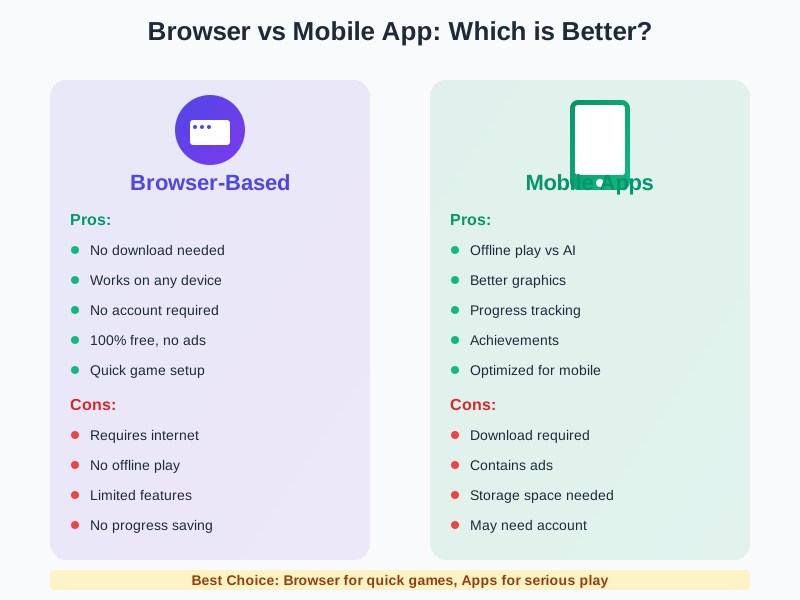
It depends on your needs. Browser versions are best for quick games with no setup - just click and play. Mobile apps are better if you want offline play, better graphics, progress tracking, and achievements. Many players use both depending on the situation.
Are the online rules the same as the physical game?
Yes! Online versions follow the exact same rules as the physical SKYJO card game. The digital platforms handle scoring and rule enforcement automatically, which actually makes it easier to learn and play correctly.
Can I play SKYJO on my phone?
Yes! You can play SKYJO on your phone either through mobile browser versions (Skyjo.net works great on mobile) or by downloading dedicated apps from the App Store (iOS) or Google Play Store (Android).
Do I need an account to play SKYJO online?
Most browser-based platforms like Skyjo.net and Skyjo-online.com do not require account creation - you can play immediately as a guest. Mobile apps may offer optional account creation for saving progress and achievements, but it's usually not mandatory.
Ready to Play SKYJO Online?
Choose your platform and start playing in seconds - no download or account needed!
Want to buy the physical game?
View Best Prices on Amazon
Loading comments...